


Coleman Technologies Blog

Coleman Technologies Blog

We can give your organization comprehensive IT services and 24/7/365 live support for a predictable monthly fee. Stop stressing about technology, and start focusing on growing your business.

There are Plenty of Reasons the Cloud is So Popular Amongst Businesses


There are Plenty of Reasons the Cloud is So Popular Amongst Businesses

Think about the apps you use daily—Google Drive, Netflix, Spotify, even Instagram. All of these run on cloud-based services, which basically means they store and process everything online instead of relying on one physical device. Businesses, big and small, are making the same shift because, honestly, it just makes sense. Let’s take a look at why you should be looking to use cloud services in your business.

It’s Way Cheaper

With the cloud, instead of paying for a ton of expensive computer servers, you just rent exactly what you need online. That’s cloud computing in a nutshell. Businesses only pay for what they use, cutting out unnecessary costs on hardware, maintenance, and IT staff to keep it all running.

Work from Anywhere, Anytime

Cloud services make remote work a breeze. Whether you’re at home, in the office, or halfway across the world, as long as there’s an Internet connection, you can access everything you need. This flexibility helps businesses keep running no matter what—pandemics, bad weather, or just a team that prefers working in their skivvies.

Stronger Security 

Some people worry that storing data online makes it easier to hack, but cloud providers actually have way better security than most businesses can afford on their own. They have teams of experts, automatic backups, and encryption that keeps data safe from cyberattacks, hardware failures, or that one guy who spills coffee on the office computer.

Automatic Updates with No Headaches

Remember the frustration of dealing with slow software updates or having to have a dedicated plan to ensure that all of your software gets the frequent updates and patches it needs to not be a security vulnerability? With cloud services, updates happen automatically in the background. Businesses always have the latest features and security patches without wasting time on annoying installs or hiring someone to do it manually.

Easier to Scale Up (or Down)

Let’s say a business suddenly gets a flood of new customers. If they’re using cloud-based services, they can quickly increase their computing power without buying new hardware. The same can be true if there are times that business slows down; they can scale back and save money. Traditional setups can’t adjust this fast.

Collaboration is Effortless

Ever worked on a group project where one person had an old version of the document, and everything got messy? Cloud-based services like Google Docs and Microsoft 365 fix that problem. Businesses use cloud tools so teams can work on the same files in real time, no matter where they are. No more emailing attachments back and forth.

It’s Good for Your Business

Businesses that aren’t using cloud services are making things harder (and more expensive) than they need to be. It’s not just for tech companies—restaurants, retail stores, startups, and even solo entrepreneurs can all benefit. With lower costs, better security, and the ability to work from anywhere, moving to the cloud isn’t just smart—it’s essential. So, if your business isn’t on the cloud yet, it’s time to ask: What are you waiting for?

The IT professionals at Coleman Technologies can help you get all the technology you need to give your organization the best chance of achieving success. Give us a call today at (604) 513-9428 to learn more.
Continue reading

Tip of the Week: How to Control File Sharing in OneDrive


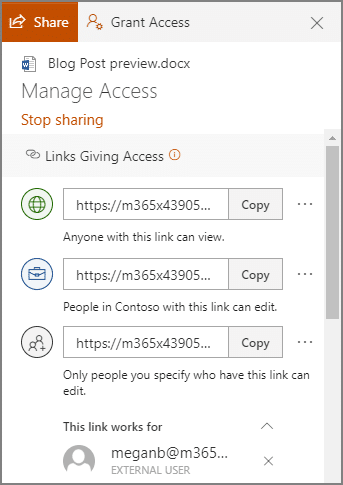
In OneDrive, a user can share a singular file or folder pretty easily. All they have to do is log in, right-click on the file/folder, and click Share.

Sharing this way allows a user to share their content with one of their contacts, send it to an email address, or copy a shareable link and send it along through an instant message or, again, and email. Doing so gives the recipient access to make edits to it by default, but the sender can restrict them to read-only access if desired.

However, you probably don’t want to micromanage your entire team to make sure they are sharing files and folders with people actually authorized to receive them. Fortunately, by using the global settings of OneDrive, you can take control past the file/folder basis to control how a user can share documents.

Controlling a User’s File Sharing in OneDrive

Assuming that you have administrative access over your OneDrive account, sign in by visiting https://admin.microsoft.com/ before proceeding with the following steps:

  •  Look for Admin centers on the left side of your display. Click SharePoint.
  • You should then be directed to the new SharePoint admin center. If you are brought to the old one, you can go to the new on by clicking on Open it now.
  • Again, on the left side of the screen, find Policies and click on Sharing.

Doing so means that you have edited the global settings, applying your changes to all accounts. To manage settings on a case-by-case basis, access Users, Active Users, and select the individual who you are attempting to manage. You should find a OneDrive tab, with adjustable Sharing options.

With privacy and security being so critical for contemporary businesses, you need to make sure you are doing everything you can to maintain control of your company’s information. Our security experts can help - reach out to us at (604) 513-9428 to get started.

Continue reading

4 Steps for Revolutionizing Your Conference Room


4 Steps for Revolutionizing Your Conference Room

We’ve seen the conference rooms of a lot of businesses, from the modified break-room with stale coffee to immaculate lecture rooms with plush, comfy seats, and everything in between.

A good conference room can do a lot to impress potential clients and customers, encourage collaboration within your team, and leave a great impression on potential employees too. While we’re not going to pretend to be interior decorators, there are definitely some important steps that we can assist with to make sure your conference room is up to the task.

Clear Out the Clutter

First things first, your conference room needs to be neat and tidy. I’ve seen workplaces with conference rooms that often serve other functions depending on the day, and that’s fine. If your office has gym equipment or occasionally converts the conference room into a daycare for employed parents, that is definitely a nice gesture. However, you’ll want to be able to quickly transform the room into a comfortable meeting space without a lot of stuff in the way.

Avoid letting your conference room become the catchall for storage, because this is something that can escalate very quickly. It’s not a room for your staff to borrow office chairs from—you should be providing the comfiest office chairs for the butts that sit at the desks all day anyway. Your conference room should be ready to use for meetings and presentations at a moment’s notice.

Thoroughly Test the Wi-Fi

Anybody working in your conference room is likely going to be on the Wi-Fi. Make sure you have very strong service and direct or very-near direct access to the access point. That might mean installing a wireless access point in your conference room, or adjusting the position of the access point that is nearest to your conference room. 

Either way, imagine the types of real-world scenarios that you will put your wireless network through; your staff is all working on the network, and you have 6 or 8 or more people sitting in the conference room, connecting to the Wi-Fi.

You’ll want to make sure you have a reliable wireless network, and that you segment out the network for guests. 

You can do some creative things to help guests get signed into the Wi-Fi; I’ve seen people simply put up a sign with a QR code, or use NFC chips that you can scan with most smartphones. You’ll likely also want to post the guest password for those who can’t scan QR codes or NFC chips.

Wireless Peripherals to Pass Around

If you have a screen (or multiple screens) to display presentations on, make sure you have some easy-to-use wireless peripherals to control and manage on-screen content. A wireless keyboard and mouse assigned to the conference room will go a long way to make things easier for participants to work together and collaborate. 

Usually, that means having an endpoint (usually a mini PC) connected to the screen, so users can sign in and pull up presentations. If this is a standard endpoint on your network, you will also want to make sure that it is secured and monitored like the rest of your endpoints.

Clear Audio and Video for Remote Meetings

There may be times when you want to host a meeting with participants who can’t physically make it to your conference room. Thanks to the pandemic, these are typically called Zoom Rooms, and they are a great way to have multiple participants on your end meet with clients and teams remotely.

There are plenty of devices on the market that accomplish this task, from conference room phones that sit in the middle of the table, to small tablets that can be moved around. Either way, you’ll want a clear audio solution that everyone will be able to hear and participate in.

Need Help Modernizing Your Conference Room?

Your conference room should be dressed to impress. We can help provide the technology that makes it a place of collaboration for your staff, partners, and clients. To get a quote, give us a call at (604) 513-9428.

Continue reading

Efficient and Secure File Sharing a Must for Today’s Businesses


Efficient and Secure File Sharing a Must for Today’s Businesses

Today’s business needs to be able to share files and data securely and efficiently. This process may seem straightforward, but there are a lot of options that the business owner or manager needs to understand. In today’s blog, we look at some steps that will help you create a strong and secure file-sharing system.

Do a Preliminary Assessment

Start by understanding your business' specific file-sharing requirements. It’s important to understand what type of data is typically shared and how much of it is on the move. This step can help you not only determine how your organization’s data is moved but also how your employees collaborate on it. Collaboration largely depends on these efficient data movements, so understanding the basics of how they share and receive data is a big step to building a file-sharing strategy that works for your business.

Choose a Solution That Fits Your Needs

You will want to select a file-sharing platform that aligns with your business needs. You have to determine if the data you have is able to be saved in the cloud or if you need to set up on-premises infrastructure to house the data. If the latter is what you choose, you need to look for features such as end-to-end encryption, multi-factor authentication (MFA), and secure link sharing. You will also need to ensure the solution allows you to easily manage user permissions and roles, making sure that only authorized personnel can access sensitive files.

Access Control

You’ll want to set up user profiles that allow you to assign file access based on roles within the company. You’ll want to provide employees with the minimum level of access they need to perform their tasks, but also ward against providing more access to data they don’t need. This strategy just reduces risk of data exposure and unauthorized access. Finally, you want to have a comprehensive system of logs of all access and file-sharing activities, which can be easily reviewed.

Maintaining Security

Data security is extremely important and to this end you will want to implement encryption tools to keep data at rest and in transit secured. You’ll need to have reliable password protection for shared files and links, particularly when sharing files outside the organization, and it’s also a good idea to implement technology that allows you to monitor and protect data from being shared that has no business being shared. 

Employee Training

There are several ways to train your employees so that organizational file sharing doesn’t turn problematic. One of the best ways is to provide security training. That means teaching them what you expect of their data handling, the importance of data protection methods (such as creating and storing strong passwords and other measures), and how to ensure that sensitive information is handled properly. 

Building a secure and efficient file-sharing system for a small business requires careful planning and the right combination of technology and practices. By choosing the right solution and having a reliable strategy for handling data, you can create a file-sharing environment that supports your business while ensuring that data isn’t stolen or lost. 

If you would like some help choosing and setting up a file sharing system that supports your business and your employees’ collaboration, give our IT professionals a call today at (604) 513-9428.

Continue reading

About Coleman Technologies

Coleman Technologies has been serving the British Columbia area since 1999, providing IT Support such as technical helpdesk support, computer support and consulting to small and medium-sized businesses. Our experience has allowed us to build and develop the infrastructure needed to keep our prices affordable and our clients up and running.

get a free quote

Understanding IT

Get the Knowledge You Need to Make IT Decisions

Technology is constantly evolving, and keeping up can feel overwhelming. Whether you want to understand cybersecurity threats, explore automation, or learn how regulations like PCI DSS impact your business, we’ve made it easy to access clear, straightforward insights on key IT topics.

Insights to Understanding IT

Contact Us

20178 96 Ave C400
Langley, British Columbia V1M 0B2

Mon to Fri 7:00am–5:00pm

[email protected]

(604) 513-9428

Coleman Technologies Awards & Memberships

Image
Image
Image


