Coleman Technologies Blog

Coleman Technologies Blog

We can give your organization comprehensive IT services and 24/7/365 live support for a predictable monthly fee. Stop stressing about technology, and start focusing on growing your business.

How to Build Better File-Sharing Systems


How to Build Better File-Sharing Systems

With collaboration playing center stage for most businesses, it’s no small wonder that file sharing is such a priority for SMBs. If you want to establish solid file-sharing practices, you need the right solutions. Today, we want to explore four ways you can establish an efficient and secure file-sharing platform.

Share with the Cloud

The cloud feels tailor-made for collaboration and file sharing.

With the ability to access files anytime, anywhere, collaboration can occur whenever and wherever is most convenient. All you need is an Internet connection and an account. Cloud-based solutions also often come with security measures that mitigate data theft and loss, so they’re not just functional; they’re also secure.

The cloud should be your go-to if you want a solution built for multiple-user collaboration.

Implement an Enterprise File Sharing Platform

Power users of file-sharing platforms can also implement an enterprise-sharing platform.

This is especially helpful for those who need to share files outside of their organization. It provides more security and functionality to control data flow. Furthermore, these platforms offer a centralized location to store and share files, making them easier to secure than other tools.

With advanced security measures like encryption and access control, you’ll never be left wanting for security.

Structure Your File Names

File naming systems offer surprising benefits for file-sharing purposes.

For one, they’re more efficient, as they will allow your team to find files more easily. This strategy clears up potential errors before they even occur, especially for those who work with a lot of files. Collaboration is fueled by efficiency, after all, and anything you can do to make it easier will be welcome with your team.

A good naming convention can also make your systems more searchable, an additional plus.

Back Up Your Files

No matter how much you prepare, accidents and unplanned incidents can happen at any time.

A backup plan will go a long way toward mitigating the damage done by these unexpected situations. Your file-sharing system should be hooked up to your backup plan to fight back against corruption, deletion, or theft. You never know when it might come in handy, and you know what they say: better to have it and not use it than not have it at all.

Plus, you might have some compliance obligations to adhere to, so it never hurts to be prepared.

File sharing is hard, but we make it easy. Call us today at (604) 513-9428 to learn more.

Continue reading

Tip of the Week: Selecting the Right Data Warehouse for Your Needs


To begin, let’s figure out exactly what a data warehouse is.

Understanding the Data Warehouse

A Data Warehouse isn’t to be confused with a Data Center, where you might store your server infrastructure. It is a system for analyzing and reporting on large amounts of data. It helps you predict trends and get a full picture of what’s going on with your business.

In order to understand the purpose of a data warehouse, it helps to look to warehouses in the real world. In short, it’s a place to store stuff.

While this may seem simplistic, it is key to the other functions of a data warehouse. By storing all of a business’ data in a central location, that data can all be referenced against each other - regardless of the original source. This means that you can use this data to generate better analytics than you may have gotten otherwise, simply because you are less limited by the data you have access to.

Selecting a Data Warehouse

Of course, not all data warehouses are the same, and the different types offer different utilities. You also have to consider if the data warehouse itself is sufficient. Let’s go over some of the considerations you will have to make during your deliberations.

What kind of data do you need to store?

For our purposes, data can be split into two types: structured and unstructured.

  • Structured data is data that can easily be organized into a spreadsheet. If your data fits the bill, a relational database would likely be a good fit for your needs.
  • Unstructured data (or semi-structured data) is data that is presented in less-uniform formats, like geographical data, emails, books, and the like. If you have a lot of this kind of data, you may want to consider utilizing a data lake over a data warehouse.

How immediate does your data need to be?

Your intended use of your data warehouse will have the largest impact on this consideration. Are you looking for business insights, or are you more focused on real-time analytics? If you are looking to find out more about your business, having more data available will give you better answers. If you are using the data warehouse to fuel a predictive analytics platform, you will need less data, as tracking trends can be done with a simple Relational Database Management System (RDMS) and won’t necessarily benefit from access to all of the data your organization stores.

How are the costs structured?

Different data warehouse solutions are priced based on different factors, usually combining the storage used, the size of the warehouse, the number of queries that are run, or the time spent leveraging the solution. Your particular use case will likely influence which solution is most cost-effective for you, whether frequent utilization makes a lower compute cost preferable or a high volume of data makes lower storage costs the logical choice.

Does it work with the tools you use?

Finally, you need to be sure that the solution you are considering is compatible with your business’ other solutions - otherwise, you won’t get the full value from your data warehouse (or create more work for yourself).

Coleman Technologies can help your business manage its technology needs. To learn more about how we can optimize your business processes, call (604) 513-9428.

Continue reading

You Need to Be Asking These 4 Questions to Maximize Security


#1: Is security a priority when we build processes?

Your business has a way that it does what it does. Are those processes created with both physical security and cybersecurity in mind? The amount of threats your business is subject to is literally innumerable. Each day new threats are created and used to try and steal money and data from businesses just like yours. When building your business’ processes, the first consideration that isn’t “can I make money this way” has to be about how to secure your business from outside threats.

Some ways you can prioritize security is to train your staff on what threats look like when they come in, ensure that you prioritize access control and proper authentication procedures, and really make sure that your entire staff is educated about the importance in keeping you secure. Making sure that all transferred data is encrypted can also help.

#2: Who has access to my files?

When we talk about access control, we talk about limiting access to data. Not all members of your organization need access to the same data, after all. Doing your best to ensure that some of your most sensitive data is protected not just from people outside your organization, but also inside.

By enabling role-based access and adding in a multi-layered authentication procedure, the security of your organization’s data will be much improved. Another good practice is to keep logs and routinely audit both them and the other protections you put in place. 

#3: How can encryption help my business?

Data in transit can be stolen. Data just sitting there in the open can be too. You will want to ensure that all of your most sensitive data is encrypted both when it’s at rest and when it’s being moved from one location to another. 

Today the most popular forms of encryption are the Data Encryption Standard (DES) or the Advanced Encryption Standard (AES). Understanding the particulars of encryption may be complex, but knowing how to use it to better secure your business’ data is not. 

#4: Is my security strategy working?

Obviously, the security that you put on your business isn’t plug and play. It needs to be properly configured to meet your business’ specific situation. The best way to get the most comprehensive security resources to protect your business’ network and data is to have knowledgeable consultants help you find the strategies and solutions that are right for you, implement them, and then routinely test them to ensure that they would stand up under pressure. 

If you would like to start this conversation, call the IT experts at Coleman Technologies today at (604) 513-9428.

Continue reading

Understanding the Benefits of Data Automation


What is Data Automation?

In so many words, data automation is the collection and transcription of data using software, rather than the outdated and time-consuming manual processes that were once necessary.

Rather than one of your valuable employees being committed to data entry instead of the other tasks that are better suited to their talents and abilities, data automation utilizes technology to attend to it. As a result, your team can focus on their other responsibilities, while your data is managed more efficiently and accurately.

How Does Data Automation Assist Businesses?

There are many ways that your business could directly benefit from data automation processes. For instance:

  • Time (and thereby, money) is saved
  • Your team is free to focus on other responsibilities
  • Data can be entered more accurately and efficiently

Consider the checkout aisle of the grocery store, and the barcodes that are scanned to identify a shopper’s intended purposes. Think about how long it would take to ring up a cartful of groceries if each item must be manually looked up, and how many mistakes will be made in the process. The modern checkout line is a prime example of the basic benefits of data automation in this way.

Want to Learn More?

Reach out to Coleman Technologies at (604) 513-9428! We can discuss the many ways that technology can be used to boost your business, including through data automation and other solutions. Give us a call today to learn more.

Continue reading

What are Digital Twins, and How Can Businesses Use Them?


What are Digital Twins, and How Can Businesses Use Them?

A digital twin could arguably be seen as a somewhat niche technological innovation. Regardless, they are an invaluable resource to quite a few industries that help the businesses that use them optimize their processes. Let’s go over what a digital twin is, and how it helps a few different business types meet their needs.

So, what is a digital twin?

A Digital Twin is a Virtualized Copy of a Physical Asset

That’s the long and the short of it. A digital twin draws on real-life data to help you refine and adjust your processes, whether that digital twin simulates a product, process, or entire environment. By collecting data from its actual counterpart, the digital twin allows you to model your projected results and make the appropriate adjustments to improve them.

To collect, store, and process this kind of data, digital twins rely on a few different technologies:

  • The Internet of Things is the foundation that enables digital twins to work. By collecting and processing information, the IoT constantly updates the data you’re receiving, so the digital twin can represent a given technology in real-time.
  • The cloud enables a digital twin to store and access the vast amounts of data it relies on to function, as well as provides the computing power needed to mimic complicated systems. 
  • Artificial intelligence helps a digital twin crunch all the data it collects, drawing more detailed insights out of it and improving the quality of the conclusions that can be derived.
  • Extended reality—an umbrella term for immersive technologies like virtual and augmented reality—makes it so that different technologies can be digitally replicated and interacted with as different strategies are implemented.

How Can Digital Twins Be Used?

Different industries all have different ways to take advantage of this technology. For instance:

Aviation

From aircraft design to maintenance, digital twins can prove extremely useful for planes and managing their operations. Boeing, for instance, uses digital twins to test their parts and designs to ensure commercial and military aircraft are as safe as possible.

Agriculture

Digital twins fill various needs in this market sector, largely helping to meet the growing needs of the world’s rising population. From resource optimization to weather modeling to livestock monitoring to supply chain management, digital twins make a litany of the related processes far simpler.

Manufacturing

The manufacturing industry, similarly to the aviation industry, can get a lot of value out of digital twins. Take the prototyping process. It is much more cost-effective to design and test a prototype digitally to help determine where it can be improved. Pair that with the capabilities a digital twin has in terms of asset tracking, and the benefits span the entire process. 

Medical

Digital twins can offer a full range of benefits to the medical industry. Medical equipment is notoriously expensive to procure and replace, so using a digital twin to help maintain it helps save providers a ton of money over time. Digital twins can also be made of anonymized patient data to help improve diagnostic capabilities and clinical research.

This has been a very, very small sample of what digital twins are capable of helping a business accomplish—not just in terms of how many industries we covered, but also in what the technology can feasibly do for them.

We’re here to help you ensure your technology serves your business in every way it can, too. Give us a call for a consultation so we can determine how we can help you at (604) 513-9428. 

Continue reading

Could Zero-Trust Make the VPN Obsolete? Experts Suggest So


Could Zero-Trust Make the VPN Obsolete? Experts Suggest So

When it comes to security, it can be challenging to keep up with shifting best practices. For instance, the use of a virtual private network has long been a staple to secure remote operations, and any decent IT service provider would recommend its use. However, this advice is changing with the growth of zero-trust access protocols.

Let’s compare these two security options to consider why this is.

Defining Virtual Private Networking and Zero-Trust Access

In order to properly compare these two security tools, it is important that we establish what each of them is meant to accomplish.

Virtual Private Networking, or the use of a VPN, creates a protected connection between two network endpoints via encryption. Let’s say you were stuck in an airport during a layover, but you had your work laptop with you. By using the VPN, you could connect back to your business’ infrastructure in order to access the data you need, without your activity being visible to others who may be snooping on the airport’s wireless network.

Zero-Trust Access is a strategy in and of itself that turns the principle of least privilege into an actionable approach, requiring comprehensive verification at each and every step of any business process. Fundamentally, the thesis of zero-trust is that everything and everyone is a threat until they are confirmed not to be—with this confirmation regularly verified throughout the user’s processes.

These two methods take very different approaches to securing your business. With the VPN, the focus is on keeping threats out, without particularly restricting the activities of those who have been authenticated. Zero-trust access, on the other hand, provides access to only what an authenticated user requires to fulfill their responsibilities.

What Does a VPN Do Compared to Zero-Trust Access?

Let’s break down different aspects that you need to keep in mind in terms of what each option provides.

Breach Containment

Should a breach occur, a VPN may help prevent the attacker from accessing more than what the VPN itself was directing toward, whereas a properly-configured zero-trust implementation will limit the breach specifically to the device, service, or application.

Cloud Support

Generally speaking, a VPN is hosted on-premise, although cloud options do exist. Zero-trust is typically hosted in the cloud, meaning that it works well in cloud-hosted applications.

Functionality

This is the crux of our discussion. All a VPN does is create a secure means of accessing different networks. Comparatively, zero-trust access does the same, but also restricts access within these networks based on predetermined policies.

Remote Support

With remote work being more prevalent than it has been in the past, ensuring a means of accessing the workplace securely is a more pressing need. A VPN enables remote workers to do so, while a zero-trust network does the same, but does so on a more granular level.

Security Strength

While the VPN does a great job of protecting data while it is being sent between two separate networks, that protection stops once each network is reached. The zero-trust network provides excellent security at every point, for every resource.

These comparisons make it pretty clear that both offer sincere benefits to a business’ security, and that both should have a welcome place in your business security infrastructure. That being said, it is also understandable why today’s security experts are predicting that zero-trust will ultimately take precedence.

In the meantime, Coleman Technologies is here to help you ensure that your business’ technology and cybersecurity are maintained and ready for you to use it. Learn more about our managed services and how they can benefit you by giving us a call at (604) 513-9428.

Continue reading

Tip of the Week: How to Properly Calculate Time in a Spreadsheet


Tip of the Week: How to Properly Calculate Time in a Spreadsheet

It isn’t a secret that working with different times in a spreadsheet can be a real pain… even if you’re just trying to add them all up. Fortunately (and a little unsurprisingly), this is because these programs have a specific function to accomplish this.

Let’s review the process you should follow in your spreadsheet program, whether you use Microsoft Excel or Google Sheets.

How to Use the Dynamic Time Function to Count Time

While restricting the ability to add times to a specialized formula may seem frustrating and overly complicated, it actually gives you more granular control over your calculations, helping make these sums more accurate and useful.

To use the Dynamic Time Function, you need a starting time. For this example, we’ll use 12:00:00 AM, making sure that the data is formatted as “Time.” In Excel, this can be adjusted from the Home menu in the dropdown box above Number, while Google Sheets has the adjustment in the Format menu, where you find the Number option where Time can be selected.

The process then depends on how you use this formula. For reference, we’ll keep it simple and work in row one, starting at column A:

=A1+TIME(0,0,0)

This represents your starting time at cell A1, combined with the time function and adjustments split into hours, minutes, and seconds. As our formula currently stands, A1 would be populated with 12:00:00 AM, and with zero changes to the time, the results cell would also populate as 12:00:00 AM.

To continue, we need to populate the time adjustments set at zero. Instead of using zero, you would populate your cell with the cell coordinates you wanted to sum up. Therefore, our new formula could potentially look like this:

=A1+TIME(B1,C1,D1)

In this case, B1, C1, and D1 will represent the numerical change to the hours, minutes, and seconds shown in A1.

So, if A1 was populated with 12:00:00 AM, and B1, C1, and D1 were populated with 2, 4, and 6, respectively, our result would be 2:04:06 AM. If B1 was instead 9, and D1 was instead 38, our final time would be 9:04:38 AM.

It can be tricky to get the hang of at first... but if you need to determine a deadline or approximate when a given task or process should end, the Dynamic Time Function is your ally.

Continue reading

Know Your Tech: PDF


The Development of the PDF
The PDF is best known for promoting the sharing of information as it was created. A PDF looks the same whether it is in digital format or if it is printed to paper, no matter what OS is being used. Before this format was created, sharing information between the two was extremely difficult, but in 1990, Adobe co-founder John Warnock wrote a paper titled A Camelot Project, in which he described the limitations of sharing information. He would go on to found Team Camelot, the group of software developers that created the PDF, a file that can be universally shared across all computing platforms.

At first, however, it held very little utility as users had to purchase Adobe Acrobat in order to use the file type. Team Camelot, however, built additional functionality as the Internet got more popular, and as its utility increased, it was eventually adopted by the International Organization for Standardization and opened up to the masses.

Advantages of the PDF
Nowadays, there are multiple types of PDFs, and their utility is tied to their makeup. The types are as follows:

  • Digitally Created PDFs - PDF files created in a digital environment, whatever that environment might be (Windows, Mac OS X, Linux, Android, etc.). These PDFs are fully customizable and editable.
  • Scanned PDFs - A Scanned PDF is effectively an image of a document. They are not inherently customizable, but there is software that can be utilized to change that.
  • Searchable PDFs - Thanks to Optical Character Recognition (OCR) software adding an editable text layer to an image layer, a PDF becomes searchable. This process enables greater interaction with PDFs like this. In a document management system, many document scanners come with the kind of software users need to convert a scanned PDF into a searchable PDF. As such, it is a core component of a paperless office.

PDFs have shown to be extraordinarily useful for businesses. They are convenient to use, universally compatible, and can be extremely secure.

For more great technology information, return to our blog regularly.

Continue reading

Tip of the Week: Using People Graph in Microsoft Excel


Tip of the Week: Using People Graph in Microsoft Excel

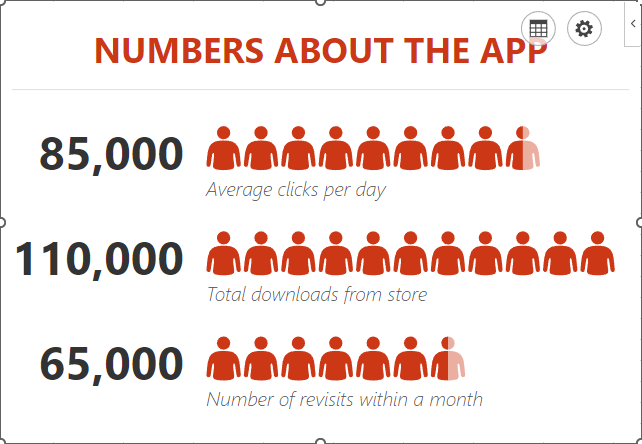
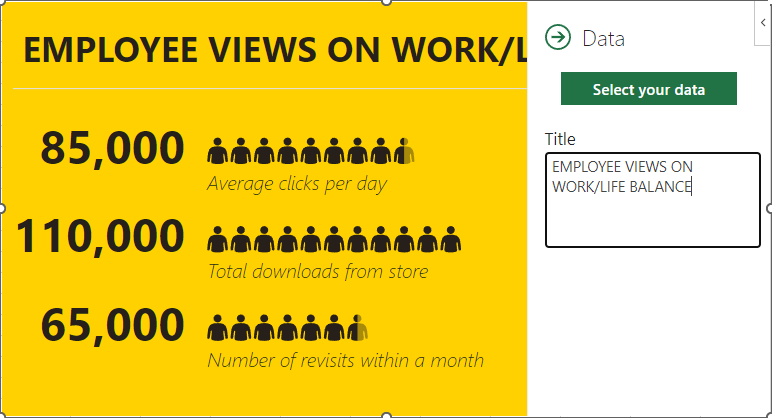
Microsoft Excel is a great way for data to be visualized, particularly as it offers various features to highlight the context of the data you’re trying to communicate with. Today, we wanted to walk you through how you can use one such feature—People Graphs—to do so particularly impactfully.

What are People Graphs?

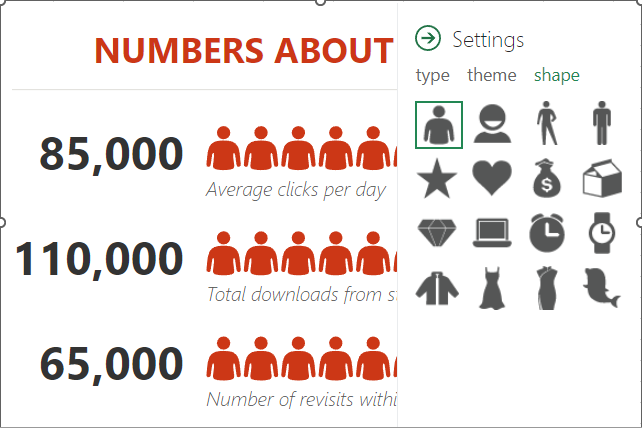
People Graphs are a Microsoft Office Add-In that allows you to create a quick data visualization. While the default icon included in the People Graphs is, predictably, a person, the graphs can be customized to display different icons—from a star, a heart, a clock, a bag of money or various others.

Let’s go over how you can create these simple graphs to present simple data points to your advantage.

Creating a People Graph

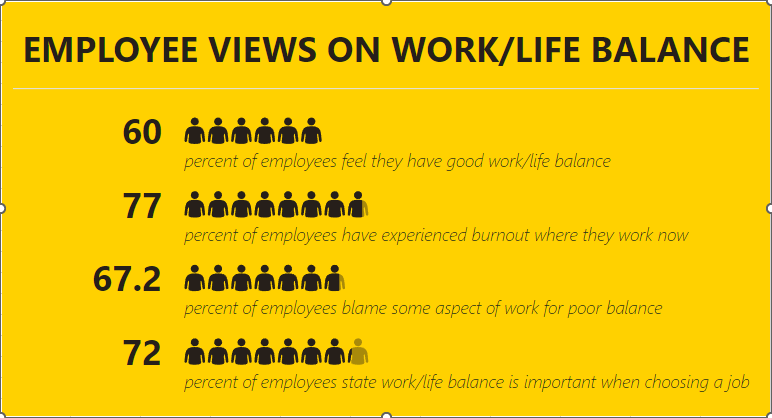
First, you need to have the data you want your People Graph to depict in your spreadsheet. Let’s assume that you wanted to share some statistics concerning the work/life balance habits of today’s workers. In one column, list out the stats you want to share, and in the next, list out the numerical values associated with these statistics.

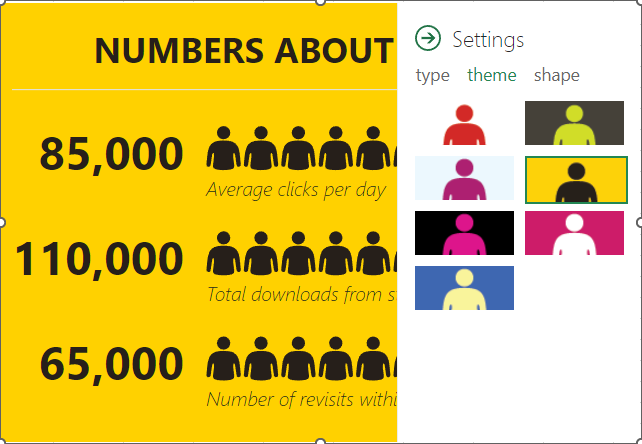
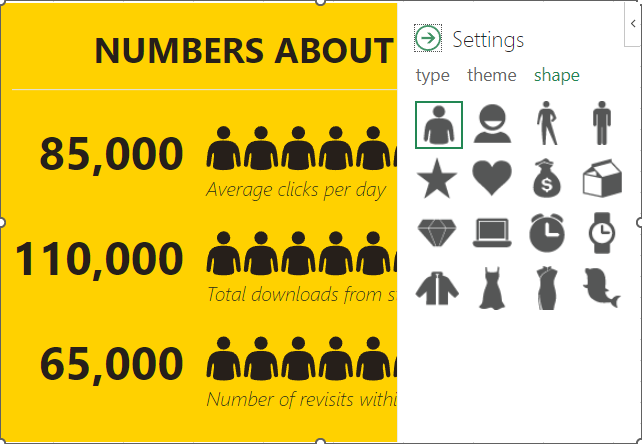
Select this data range. Then, in the Insert toolbar, select People Graph under Add-Ins. A premade graph will appear on your sheet. Select the Settings option, which will appear in the top-right corner when you click on the graph.

From there, you can customize what your graph looks like, its color scheme, and the shape of the icon itself.

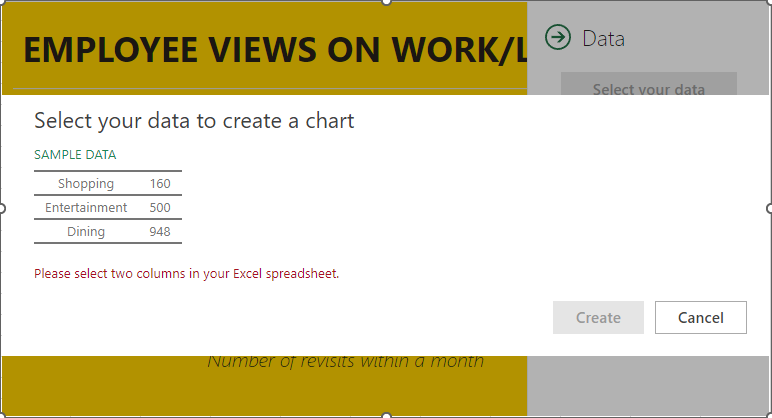
Once you’re pleased with the appearance of your graph, you can then select the grid button that appears next to the settings option. From there, you can customize the title and select the data that your graph pulls from.

Once you’ve selected the data, click Create, and your People Graph is complete.

Hopefully, you find plenty of use out of this capability!

Continue reading

Big Tech is Bigger Than You Realize


Big Tech is Bigger Than You Realize

As technology seeps into every part of everyday life, the market for technology has exploded. This has led to technology companies growing to be massive and seemingly uncontrollable entities. Let’s take a look at big tech and its effect on society. 

What Is Big Tech?

Big Tech can be summarized as a series of companies that control a large part of the working Internet. When you look to identify the companies that make up the so-called big tech, you don’t have to look too far. The companies most identified with this moniker are some of the most successful companies in the world at the time of this writing. They include the big five:

In the United States, some of the other companies that are often considered big tech include:

There are several other companies abroad that could be included as big tech, regardless of their affiliation with host countries’ governments. They include:

All of these companies not only have a market capitalization value of over $17 billion and most, if not all, have been making billions of dollars in profit for years. The size of these companies hasn’t happened by mistake as most of them not only offer products and services that are widely used by the population, they also have set a standard for the way they use customer data. That’s what we will take a look at today.

Big Tech’s Use of Personal Information

It first has to be said that a lot of the way these huge technology companies function echoes the way that large industrial companies functioned at the turn of the 20th century in America. It took decades before proper regulation was enacted to effectively break up monopolies in the early part of the 20th century and as these tech companies grow and swallow up their competition, it will be on the governments of the world to step up and forcibly regulate this non-competitive behavior. Since one of the largest revenue strains is the acquisition and sale of individual’s personal data, it creates a situation where these companies take on a large responsibility and if there isn’t any regulation to how these firms conduct business, they can quickly take advantage of their authority. 

For over a decade, as the demand for Internet-based advertising grew, so did these companies’ reliance on capturing as much data as they could. This practice is at its high water mark even though there have been major strides made in legislative circles to try and limit the power these tech companies have over their users. Unfortunately, since these are some of the most lucrative businesses in world history, lawmakers have found regulating these businesses to be extremely difficult. 

What You Can Do to Protect Yourself from Big Tech

If you are like the billions of people around the world that gravitate toward using these companies’ products, you need to understand your role in protecting yourself, and improving your own data privacy (as these companies aren’t going to willfully do it for you). 

  1. Use Alternatives - There are alternatives to using services produced by big tech. Obviously, Google Search is the most utilized search engine but there are others like DuckDuckGo that provide a search engine with completely anonymous search results. Limit the amount of personal information that you put on social media, as anything you share is inevitably part of the consumer profile the companies produce on you.
  2. Pay to Clean Up Your Online Profiles - Another thing you can do is pay for a service that will delete your personal information. Services like LifeLock will search the internet and scrub any of your personal information that is out there. This service does come with costs and an annual subscription (of course), but can be a good way toward controlling the amount of places your personal information shows up. 
  3. Have Good Password Hygiene - This won’t help combat big tech’s constant surveillance, but it will protect you should the data they collect just be hanging out online. Create strong and unique passwords for every account and check sites like HaveIBeenPwned.com to see if you have been the victim of a data leak somewhere. 
  4. Use a VPN - While not all VPNs are created equal, they can be great tools to obscure your physical location and where you navigate online. They encrypt browsing histories and can even hide you from your ISP to ensure that you get access to regionally unavailable content. One tip is to use a VPN that you don’t get on the various app stores because they can often come with bloatware attached, while some do exactly what the big tech companies do and harvest your information for their own profit. 

Only time will tell if governments reel in these companies' data collection and sharing practices. The European Union has created the GDPR (General Data Protection Regulation), which works to hold big tech companies accountable for individuals’ data privacy. It has cost big tech companies in excess of €2.1 billion in fines in 2023 alone and it seems to be rising every year.

It seems inevitable that we are forced to do business with Big Tech, but you don’t have to allow them unfettered access to your personal information. For more great technology-related articles, return to our blog soon. 

Continue reading

There’s Value in Outsourcing Your IT, Part IV


As we have done throughout this series, we will compare the experience that a managed service provider is able to deliver, compared to the alternative.

Cloud Services

Brennan’s business gathers and stores a substantial amount of data, as most businesses do. His business relies heavily on this data, as he runs an organization which depends on client contacts. To store all of this data, Brennan decides to do some research and build his own server. He understands the basics, and begins work. Not only does this take up a large amount of space, it also requires an absurd amount of power to operate. This makes the office unbearably hot. Furthermore, Brennan hooks up connections incorrectly causing equipment failure. This is not covered under warranty, and the initial cost of setting up a server is astronomical. 

On the other side of the town, Dale works in the music industry. His business decides to go with managed services. Dale is quickly connected with a trustworthy, dependable cloud service. He is then able to store all of his data and applications in the space provided by this service. It only costs a minimal monthly fee in comparison to the initial cost a server build would require. 

Backup and Disaster Recovery

Let’s assume both Brennan and Dale are given the same set of circumstances. A flood causes both businesses to be completely under water. How differently will these two business owners handle this disaster?

Brennan, panic stricken, attempts to grab whatever equipment he can salvage. His business relies entirely on the information stored within his computers. He is only able to get a small number of computers operating again, and since all of his data was in-house, nearly all of it is destroyed. Brennan’s business is in some truly dire straits. 

Dale immediately begins his backup and disaster recovery plan. His plan has been tested recently, so he is confident that his entire business can operate off-site. All of his data is stored in the cloud, which means it is all accessible anywhere there is internet. Dale’s cloud service also goes the additional mile of storing his data in an additional place. This ensures that there truly is a backup, and the same disaster that causes a backup plan to be utilized does not destroy the backup data. 

Data Warehousing

The process of combining seeming less unrelated data into a singular platform is data warehousing. This process helps businesses fuel their analytics as well as their business intelligence platforms. These platforms are turning into some of the most important tools a business owner can utilize, as they provide immense value by providing decision makers a thorough knowledge base.

This processing requires a bit of computing power. In fact, it requires more computing power than Brennan’s entire home-made system is able to muster up. Since Dale utilizes managed services, he has no issues accomplishing his goals. His provider’s flexibility ensures he is able to adjust his infrastructure as needed. 

Managed IT Value - Up Next 

In the next part of our series, we will be discussing how a managed service provider can assist with IT procurement. Coleman Technologies is always available to answer any questions you may have, so give us a call at (604) 513-9428 today!

Continue reading

The Cloud is Only Helpful if It’s Secure


The Cloud is Only Helpful if It’s Secure

We have not been shy about expounding upon the benefits of the cloud for businesses, as these benefits are both considerable and accessible. That being said, not even the cloud is completely perfect, and there are security errors that can easily be made.

Let’s go through these security errors to see if any sound familiar to your situation.

Missing Access Controls and No Multi-Factor Authentication

Here’s the thing: if your cloud resources are open to anyone, nothing in them can be considered secure. This is why proper access controls—ideally supported by multi-factor authentication—are so important to have.

The data and processes that the cloud can help you support are valuable to your business. Frankly, they’re critical. Leaving them exposed thereby puts your business at risk. Implementing access controls to limit access to your cloud resources to only the team members that actively need them is therefore necessary—and this access should also require multi-factor authentication requirements (identify authentication measures that go beyond just the username and password combination) to be met before it is granted.

You Have No Backups

Today’s businesses have various options available to them, in terms of how they put the cloud to use. Many will elect to utilize public cloud resources that are maintained and managed by an external provider, many will host and maintain their own cloud infrastructure within their business, and many will use a hybrid model that incorporates both for different purposes.

Regardless of the type of cloud you use, it is important that you don’t put all your eggs in one basket. Remember, the cloud is just another server that you are able to access remotely. What if something were to happen to the cloud infrastructure you were relying on?

This is precisely why it is important that you have backups for all of your cloud data—especially for that which you use a private, self-hosted cloud to store. And while it is true that most reputable cloud providers will actively store your data in numerous physical locations as a form of protective redundancy, it is always best to get this in writing in case the worst winds up happening.

Cloud Data is Left Unencrypted

Of course, backups are just one element of keeping your data safe. Again, while most public cloud providers are relatively very secure, data leaks and theft are not unheard of. Furthermore, data needs to travel back and forth between the user’s endpoint device and the cloud infrastructure, giving an enterprising cybercriminal the chance to take a peek while said data is in transit.

In this context, avoiding a breach will require you to keep your cloud data encrypted, which scrambles it to anyone who tries viewing it without the proper decryption key. This measure is actually required by many regulations that businesses of assorted kinds must abide by, including the Payment Card Industry Data Security Standard (PCI DSS) and the UK’s General Data Protection Regulation (GDPR), making noncompliance a direct detriment to your business in general.

We Can Help You Ensure Your Use of the Cloud is Secure, While Remaining Beneficial to Your Business

In fact, we can say the same for all of your business’ critical technology. Here to provide British Columbia with the best that the managed services model of technology support has to offer, we’re hoping to get the opportunity to assist you and your business in accomplishing more. Find out what we could do for you by reaching out to us at (604) 513-9428.

Continue reading

What Exactly is Personally Identifiable Information?


What Exactly is Personally Identifiable Information?

It’s incredibly important to keep your personally identifiable information secure, but what exactly constitutes PII? Today we offer a definition and suggestions or strategies to help you keep your PII safe.

The Definition of PII Depends on Who You Ask

If you want to protect PII to the best of your ability, you first need to understand what it is, but the answer to this question is not exactly clear-cut.

The United States identifies a couple-dozen identifiers in its legislation, but other countries have different ideas for what is considered PII. The European Union, Brazil, China, and even various US states like California and Virginia have different ideas of what makes for PII. The General Data Protection Regulation (GDPR) sees race, political opinion or affiliation, religion, and sexual orientation as PII, but the California Consumer Privacy Act does not.

With so many different factors and variables in place, it’s hard to define PII, which in turn makes it hard to protect it. Five US states want to hold companies more accountable for failing to protect PII, and regulators are in the same boat. For example, Morgan Stanley Smith Barney failed to properly dispose of consumers’ PII on servers and drives that they wanted to sell following a big move, resulting in a $35 million fine.

Avoiding Fines for PII Security

The first and foremost thing you need to account for is the PII as it is outlined for your industry. Take this information into consideration right from the start so there is no room for error or confusion. Implement it into your data handling and sharing practices immediately to ensure compliance.

Furthermore, you’ll have to test your protections to make sure that you are keeping your data as safe as possible. Be sure that the data, even if stolen, cannot be used to identify the individual.

To top it all off, implement solutions designed to protect your data on all levels, including encryption, identity and access management, and role-based permissions.

Coleman Technologies can help to make sure that your business is protecting its personally identifiable information. All you have to do to get started is call us at (604) 513-9428.

Continue reading

Your Antivirus Crash Course (Implement Security Solutions Today)


Your Antivirus Crash Course (Implement Security Solutions Today)

Antivirus is a staple security solution for businesses and everyday PC users, but have you ever considered how it works? By thinking through some of the details, you might gain a greater understanding of how antivirus works, what it does, and why you need to keep it updated. Today, we’re going to discuss just that, starting from square one.

First, the Threats

Antivirus is designed to detect threats on your company’s network, but how exactly does it do that?

It’s all based on threat definitions, an idea that is known as signature-based detection. Antivirus software typically has a long running list of viruses and other types of threats called a signature database against which your computer cross-checks. When you download a file or program, the antivirus software will see if it can find a match, and if it does, it blocks the file from being opened.

Since threats are constantly evolving, you need to ensure you’re using up-to-date threat definitions, otherwise your antivirus won’t be able to identify threats it doesn’t know to search for.

Next, the Search for Suspicious Behavior

Since not all threats are found in the aforementioned signature database, the antivirus software has to use different metrics to discover potential threats on your network.

Antivirus software can detect suspicious behavior to see if an application or program is acting the way it should. It might catch a program changing settings behind the scenes, for example. Once the antivirus software has identified potential suspicious behavior, it can take steps to block it.

You can think of it like a security system that catches criminal activity in the act, then uses the evidence to issue a “sentence.”

Finally, Quarantining and Removal

Cyberthreats are dangerous, and they need to be addressed as such.

Antivirus tools will lock threats into a quarantine where they can be safely handled by your security team. While in quarantine, it cannot cause you any more harm. From here, a security professional like our team at Coleman Technologies can remove the threat from your infrastructure without any risk of further damage.

Of course, it’s not always a clean removal in this way, and some threats are more resilient and sticky than others, but rest assured that an antivirus is one of the best ways to keep your business safe while conducting business online.

Want Real-Time Protection Today?

We’re sure you’re already using an antivirus tool, but is it the right one for your business? We can equip your business with an enterprise-grade antivirus solution that will keep it safe for the long haul. Learn more by calling Coleman Technologies at (604) 513-9428 today.

Continue reading

Please, Please, PLEASE Don’t Include Sensitive Info in Your Emails


Please, Please, PLEASE Don’t Include Sensitive Info in Your Emails

Email is a great communication tool. However, certain things are just unsafe to communicate via email.

Let’s go through a list of such things. Better safe than sorry, after all.

What Should Never Appear in Your Inbox?

Passwords/Other Authentication Credentials

The advice is simple enough: don’t share credentials you use through email. While email is relatively safe, and you can delete messages on your end, you cannot ensure that the message is appropriately deleted and the recipient adequately protects the data. Plus, emails can be hijacked if either account is compromised, and you won’t know if that is the case until it’s too late.

Payment Card Numbers and Financial Details

Similarly, you should avoid sharing any payment or card details via email. It doesn’t matter how diligent you are about keeping your email cleansed of sensitive information… it is all about how diligent the person on the other end is. Unfortunately, you can’t assume they’ll respect your data security as they should.

Documents Under Attorney-Client Privilege

Are you starting to see a pattern here?

Privileged information should never be sent via email simply because—again—you have no way of guaranteeing that someone without privilege will not view it. These kinds of documents need to be handled much more carefully than to send them through any email platform.

Social Security Numbers

Considering how much official business a Social Security number is used for, it has been drummed into most of our heads how important it is to keep it secure. However, many people won’t think twice before sending this critical number in an email… a communication method that isn’t secure enough for all the same reasons we’ve already discussed. Unfortunately, this is too often overlooked, and an email’s security is overestimated.

Financial Account Numbers

This is extremely similar to the payment card situation we already addressed, except that access to a financial account would allow someone to take the funds and disappear with their ill-gotten prize. Therefore, sharing any financial information—such as account numbers—via email is also a bad idea, and any messages that contain it should be encrypted first.

Protected Health Information

Protected health information is extremely personal and private, not just because it reveals an individual’s most intimate details but also because these details can be used to a cybercriminal’s advantage in numerous ways… not to mention interfere with medical care.

State ID Numbers

This one—a state employer ID or state EIN—is used to help identify businesses for tax purposes and other governmental interactions. As such, it is extremely important for your business to protect, as scammers could use it to pose as a business representative and cause no shortage of headaches and confusion. This number could allow a cybercriminal to steal any tax returns due to your business, order goods as your business and stick you with the bill, or apply for unwanted loans that you would be on the hook for.

Long story short: don’t send these numbers in an email.

Driver’s License Numbers

If a cybercriminal were to gain possession of a driver's license number via one of your emails, they would have a key factor in perpetrating various crimes, posing as whoever’s license they had a number for. As such, a scammer could use this stolen identity to do a variety of things, from opening new financial accounts to filing for assorted benefits to claiming prescription medications to running more scams in your name (and everything in between). Again, the risks are not worth it.

Passport Numbers

Much like the aforementioned driver’s license number, a passport number in the wrong hands can accomplish many of the same scams and criminal activities. Lines of credit, government benefits, and more can all be claimed using a passport number as identification. As such, it is important to protect this number, and sharing or storing it in an email is not the way to do so.

It is Important to Be Vigilant When Composing an Email

Don’t let a fundamental mode of business communication be what makes your business vulnerable. Coleman Technologies can help you keep your business email secure. Give us a call at (604) 513-9428 to learn more.

Continue reading

How to Use Business Analytics to Fast-Track Success


How to Use Business Analytics to Fast-Track Success

Data is at the heart of all successful modern businesses. The information you collect and store can help you make better decisions, plan better strategies, and gain a competitive advantage. Let’s look at how your raw data can be refined into more meaningful insights through the use of business analytics tools.

How Business Analytics Work

Business analytics help you turn your data into action. With the right tools, you can make sense of the elements that impact your business, like:

  • Your business performance
  • Current trends in your market
  • Your customer behaviors

In essence, analytics takes the nitty-gritty behind your organization’s operations and helps you create real change. When used appropriately, analytics can guide your organization’s decision-making.

Why Use Business Analytics?

Larger businesses used to be the only ones capable of leveraging these tools, but SMBs now can do so as well. You can use it to perform the following tasks:

Use Data to Fuel Decision-Making

If you make decisions based on facts rather than assumptions, you can see real progress with better business choices. 

Identify Market Trends and Customer Preferences

Once you understand the market and your customers, you can better address the needs of the greater business niche you have adopted and your customers.

Improve Operational Efficiency and Cut Costs

Business is all about being efficient with what you have. There’s no need to work harder than you need to, and analytics can help you identify opportunities to do more of this.

Business Analytics Can Improve Your Organization

It can be challenging to make sense of this data, but SMBs have several options to make it more manageable. Here are the steps you can follow:

Compile Your Data

First, you have to collect and organize your data. This might include customer, financial, and sales data. To make the task easier, you can use various platforms, such as your customer relationship management software, for inventory management tools.

Once it’s all organized, you can analyze it for patterns and trends.

Implement the Right Tools

If you want to use your data properly, you’ll need the tools to do so. There are plenty of tools on the market, and we would be happy to recommend those we have used successfully.

How to Measure the Success of Business Analytics

You want to make sure the effort you expend to make good use of your data is worth it, which is where setting up key performance indicators comes in handy. KPIs help you determine your own metrics for success, like increased sales, reduced costs, and improved customer experiences. If you’re not improving your business with data analytics, then what good are they?

You Can Count On Us to Equip You with the Right Tools

We want our clients to have the best tools available, and you are no exception. Contact us at (604) 513-9428 today to learn more about using your data to its full potential.

Continue reading

Important Statistics to Keep in Mind Concerning Your Cybersecurity


Important Statistics to Keep in Mind Concerning Your Cybersecurity

It is so important to keep your business secure nowadays. Statistics show this to be the case. Don’t believe us? We can share a few of these stats and explore what they mean, just to prove it.

Predictions Place the Global Annual Cost of Cybercrime this Year at $8 Trillion

With an estimated 400 million or so small and medium-sized businesses around the world, that breaks down into $20,000 of damage to each. Of course, in the real world, cybercrime isn’t divided up so equally. Many companies will be impacted less, and others will be impacted a lot, lot more. Speaking of which…

By 2025, Cybercrime is Set to Reach $10.5 Trillion

That’s quite a jump, especially when you update the impact to each of the 400 million SMBs around the world. Instead of about $20,000 damage each, this figure equates to $26,250… which, again, would not be evenly distributed.

This makes it all the more clear that cybersecurity not only needs to be seen as a priority for the world’s SMBs (including those around British Columbia) now, but also and even more so in the future.

Phishing Attacks Were Blamed for 80% of Cybercrime in the Tech Sector

Phishing—or the use of fabricated communications to illicitly gain access to a resource—is a huge threat nowadays, simply because of its use as a kind of delivery system for other forms of attack. When four out of five attacks involve phishing in some way, you can’t afford not to be prepared to spot and stop it.

Hopefully, These Statistics Start to Illustrate the Importance of Cybersecurity

If you’d like to learn more about your business’ potential protections and what we can do to ensure them, make sure you give Coleman Technologies a call at (604) 513-9428.

Continue reading

3 Types of Regulations Your Business Should Be Aware Of


3 Types of Regulations Your Business Should Be Aware Of

Your business is likely subject to certain compliance laws and regulations depending on the type of data you collect from your clients or customers. Today, we want to emphasize the importance of your business considering regulation and compliance when managing its data and IT resources, as without doing so, you run considerable risk.

Consumer Personal Data

You probably collect certain information from your clients and customers, such as their names, emails, phone numbers, and so on. You might use this to provide better service to them, but collecting and holding on to this information means that you are subject to the General Data Protection Regulation (GDPR)—particularly if you collect personally identifiable information or sensitive information like Social Security numbers.

Financial Records and Transactions

You’re in business to make money, and in order to make money, you have to receive payments somehow. Therefore, the necessity for financial records and transaction ledgers is there. This might include tax documents, payment card information, bank account details, and so on, and they all require adherence to regulatory requirements. One that you’re likely to see is the Payment Card Industry Data Security Standard, or PCI DSS, which requires you to protect data from card payments in various ways. This might involve securing your payment portal, protecting and auditing the system, and ensuring that it complies with other laws.

Health and Medical Records

Healthcare and other health-related records are extremely private by nature, so they must be protected per the Health Insurance Portability and Accountability Act, or HIPAA. If you store information on patient demographics, medical history, treatment records, and insurance information, you need to protect it, period. To ensure data is transmitted and stored securely, you can use encryption, access control, multi-factor authentication, and other powerful security measures.

Take Responsibility for Your Data Security

Hackers will always take advantage of businesses that don’t take the time to consider cybersecurity, and when compliance fines and penalties are involved, you cannot afford to slip up. You have to accept the fact that your business is a target, and ready or not, the hackers will launch attacks at you until they get their way.

Coleman Technologies can help your business master cybersecurity and regulatory compliance. Call us today at (604) 513-9428 to learn more.

Continue reading

Securing Cloud Resources is More Critical than Ever


Securing Cloud Resources is More Critical than Ever

Cloud computing as a whole has been one of the most transformative technologies for businesses. With so many companies (upward of 90 percent of modern businesses) using some type of cloud computing, more companies than ever are really leaning into the technology and use it for mission critical business processes. Let’s take a look at some of the ways businesses can secure their cloud resources. 

Encryption

Encryption ensures that data is converted into a secure format before being stored in the cloud. Advanced encryption technologies now enable data to be encrypted both at rest (when stored) and in transit (when being transferred between systems). This makes it extremely difficult for unauthorized users to access sensitive information without the encryption key.

Zero Trust Security

The zero trust model assumes that no one, whether inside or outside the organization, is automatically trusted. New zero trust architectures verify each user and device before allowing access to cloud data, using methods like multi-factor authentication (MFA), identity verification, and continuous monitoring of activities.

Artificial Intelligence and Machine Learning 

AI and ML are being used to detect and prevent security threats in real time. These technologies can analyze patterns, identify unusual activities, and work to predict potential risks before they become problems for your business. AI also automates security tasks, allowing security teams and network administrators to respond faster.

Secure Access Service Edge

SASE combines network security functions such as secure web gateways and zero-trust network access, with wide-area networking capabilities. SASE helps businesses control how their data is accessed and ensures security policies are enforced consistently across all locations and devices.

Data Loss Prevention 

DLP technologies monitor cloud data for any potential leaks or breaches. It helps prevent sensitive information from being accidentally or intentionally shared with unauthorized users. By using automated tools, DLP ensures that critical business data stays within the company’s security perimeter.

Blockchain Technology 

Finally, blockchain is being explored for securing cloud data by ensuring tamper-proof data transactions and distributed storage. Blockchain’s decentralized nature provides strong protection against unauthorized access, as changes to the data require consensus across a network, making it harder for attackers to manipulate records.

If your business—like many others—relies heavily on the cloud, you need to understand the best ways to secure your data in transit and to protect your business overall. Give the IT experts at Coleman Technologies a call today to learn more about cloud security.

Continue reading

What You Need to Know About Your Personally Identifiable Information


What You Need to Know About Your Personally Identifiable Information

Hackers are always on the lookout for personally identifiable information, or PII, as it’s an immensely lucrative resource. You’ll need to protect it if you want your business to continue operating safely and efficiently. Let’s go over what PII entails and what kinds of data you might find under this term.

What Constitutes PII?

The National Institute of Standards and Technology’s (NIST) Computer Security Resource Center (CSRC) defines PII as such:

“Any representation of information that permits the identity of an individual to whom the information applies to be reasonably inferred by either direct or indirect means.”

Let’s say your business had a contact named Charlie Brown, some of their data might include the following.

Examples of PII

If you hosted the data for this totally fake individual named Charlie Brown, you might be responsible for the loss of the following data:

  • His name
  • His address
  • His phone number
  • His personal identification numbers
  • His information that identifies his property
  • His personal features
  • His asset information

Data Can Combine to Constitute PII

Depending on the other information you have collected, the following combinations could be considered PII as well:

  • His date and place of birth
  • His race
  • His religion
  • His weight
  • His activities
  • His geographic location
  • His employment history
  • His medical data
  • His educational history
  • His financial data
  • His family information

Hypothetically, if someone had Charlie Brown’s employment history and family information, they could have enough to be considered PII.

Protect Your PII at All Costs

The damages that could result if you do not take proper care of PII stored on your company’s infrastructure are devastating to say the least. We recommend you call us today to learn more about how to secure it all. Contact us today at (604) 513-9428.

Continue reading

About Coleman Technologies

Coleman Technologies has been serving the British Columbia area since 1999, providing IT Support such as technical helpdesk support, computer support and consulting to small and medium-sized businesses. Our experience has allowed us to build and develop the infrastructure needed to keep our prices affordable and our clients up and running.

get a free quote

Understanding IT

Get the Knowledge You Need to Make IT Decisions

Technology is constantly evolving, and keeping up can feel overwhelming. Whether you want to understand cybersecurity threats, explore automation, or learn how regulations like PCI DSS impact your business, we’ve made it easy to access clear, straightforward insights on key IT topics.

Insights to Understanding IT

Contact Us

20178 96 Ave C400
Langley, British Columbia V1M 0B2

Mon to Fri 7:00am–5:00pm

[email protected]

(604) 513-9428

Coleman Technologies Awards & Memberships

Image
Image
Image