


Coleman Technologies Blog

Coleman Technologies Blog

We can give your organization comprehensive IT services and 24/7/365 live support for a predictable monthly fee. Stop stressing about technology, and start focusing on growing your business.

Focus Your Technology on Producing Efficiency


The Cloud
The cloud has risen in popularity over the years, and it’s because the benefits are simply too incredible for businesses not to adopt the cloud. Many of these benefits are a result of the cloud improving productivity. For example, cloud computing’s flexibility makes it great for use on mobile devices. Users are no longer limited to being in the office, and as long as they can access resources in a secure way, they can get just as much work done while out of the office over the Internet as they could if they were in-house.

Outsourced IT Management
Technology is only worth the investment if you have the time and resources available to properly manage it, as if you fail to take proper care of your technology, it could fail much sooner than you expect it to. The problem is that not all businesses can afford to hire a full-fledged in-house IT department to properly maintain their IT infrastructures. Thankfully, businesses like Coleman Technologies provide outsourced IT management to businesses with limited budgets who want to turn IT from a capital expense to an operational expense. Even if you have in-house IT resources, you can supplement them with outsourced IT to save time and make opportunities for other employees to get more value out of their employment with your organization.

Collaboration Solutions
There are many solutions out there that are designed to help your organization be more effective at collaboration. Whether it’s Voice over IP, hosted email, or instant messaging applications, your organization can use them to collaborate and share experiences in a way that facilitates cooperation and productivity.

Does your business want to implement technology to focus on improving productivity? Coleman Technologies can help. To learn more, reach out to us at (604) 513-9428.

Continue reading

Efficiency Is More Likely to Produce Business Success


Operations change over time. It’s likely that your business’ operations don’t even remotely resemble what they were in previous years. For example, mobile technology first became more popular for computing around the year 2013, and “unified communications” was a hot commodity in the business world. Nowadays, productivity and collaboration solutions using mobile devices are some of the most basic solutions out there.

Many organizations fall into the trap of believing their past successes guarantee their future, but this isn’t necessarily the case. The reverse could be true. Here are some questions to ask if you suspect that your organization could be falling into complacency:

  • Are any potential changes or growth opportunities avoided or rebuffed through the use of highly selective facts?
  • Do conversations amongst your team skirt around topics like new markets, possible competition, or other developing business opportunities?
  • Are failures used to postpone new attempts instead of as learning moments?
  • Do meetings frequently end in a holding pattern?

Any of the above questions indicate whether or not a business has gotten too comfortable, preventing them from making sound decisions. Thankfully, once you’ve identified this complacency, it becomes easy to resolve it. Try asking these questions about your business, its policies, and its culture:

  • Is there any way that your processes could be made more efficient?
  • Does your business plan reflect the goals that your business is currently striving for?
  • Is your service offering a good fit for your current audience? What needs will they have in the near future?
  • Are there any technologies that could soon cause a disruption in your market, or could be used as an invaluable tool?
  • How engaged are your employees?

Answering these questions will give you all the ammunition you need to put together a solid understanding of what your business needs to do on both a local and industrial level. Of course, this can be challenging as well, as you might encounter issues that need to be resolved before you can make progress as a business.

Coleman Technologies can help your business implement IT solutions designed to keep your business running efficiently while still maintaining the status quo. To learn more, reach out to us at (604) 513-9428.
Continue reading

Tip of the Week: What Google Lens Can Do


Explaining Google Lens

Downloadable from the Google Play Store, Google Lens is a utility app that incorporates artificial intelligence to make your smartphone’s capability to take and store images even more useful. With Google Lens, your phone can identify the elements in an image and give the user in-depth and contextual options based on it. Let’s say you wanted to find out what the flowers were that someone had planted outside their house. Using Google Lens, you could point your camera at the flowers and identify them that way.

Now, just consider how this could be applied to the modern, mobile workplace:

Copy and Paste Real-World Text

The ability to copy and then paste content is one of the most often-used functionalities in the office, so why not bring it to the physical world (sort of)? Using Google Lens, you can capture text with your camera from any media just as though it was content on a website. Simply press on the desired text to select it, press the Copy button at the bottom of the screen, and there you are. This text can then be shared directly to the clipboard of any computer with the same Google account actively logged in.

Extract Contact Information from a Business Card

While business cards are a great way to build business relationships at networking events, they don’t exactly fit in with most of today’s business environment. Lens can fix that by capturing the details printed on the card and giving the user various options. Whether you want to call the contact shared on the card, visit a website printed on it, or send a quick text or email message, Lens makes it simple to do so.

Create a Calendar Event

While calendar events are a great way to keep one’s schedule organized, helping one fulfill their obligations, they can become arduous to input into a mobile device. Google Lens can automate that process, pulling the necessary information from a flyer, an appointment card, or any other media and giving the user the option to Create calendar event.

Of course, this has been but a brief sampling of Google Lens’ capabilities. We encourage you to download it and see how much it helps you. If you’ve used Google Lens before, let us know how it worked out for you in the comments!

Continue reading

How to Help Keep Your Mobile Devices Kicking for Longer


How to Help Keep Your Mobile Devices Kicking for Longer

It’s a common enough frustration—just as you really need it, your mobile device’s battery is on its last legs. This is something that we all would like to avoid if we could. That’s why we wanted to take the time to share a few ways to prolong your device’s battery life just a bit longer.

Five Tricks to Prolong Your Device’s Battery Life

While there are a few other means of keeping your device charged for longer, we figured it best to stick to the simplest and most cost-effective ones.

Avoid Apps that Drink Up Charge

Different applications will call for different things, and if those demands utilize more of the system’s resources, more power will be necessary to support them. Basically, the more computing that needs to be done, the more power will be used up. This is why using multiple apps at once eats away at your battery faster, too. Apps that keep the screen on, play video, or make your phone generally feel warm to the touch tend to be the ones that consume the most battery.

Keep Locked When Not Actively Using

Locking your phone offers a variety of benefits, not the least of which is the fact that it turns off the screen, thereby saving your device a considerable amount of power.

Update the OS

Your phone’s operating system effectively controls how the device works, which itself will influence how long its battery lasts. In fact, part of the improvements made during updates are generally related to battery optimization.

Therefore, an up-to-date OS and the bug fixes it brings often assists with battery performance and longevity.

Set Sleep Mode to Kick in Faster

As a power-saving measure, most mobile devices have a setting that will turn off the screen and suspend background processes until the phone is actively used once again. Once sleep mode is activated, it requires a password to disengage, making it a basic security feature as well as a power-saving one.

Minimize Notifications and Location Services

While both location services and notifications are meant to make a mobile device’s processes more convenient, they can also result in the battery being drained. Try turning off all non-essential notifications for less drain on the battery. Limiting location services to only kick in when an app is actively being used both maintains your privacy, and your battery!

Trust Coleman Technologies to Ensure Your Business IT Works as Well as Possible

Give us a call at (604) 513-9428 to find out what our managed IT services can do to improve your work processes!

Continue reading

Tip of the Week: Adjusting Microsoft Word to Match Your Style


Before we get started, we want to make sure that you know to consult with your IT department or provider before you go to make any of these changes. That way, they will be able to undo any mistakes you or your employees might make during the following processes.

Customizing Word’s Rules to Meet Your Preferences

It’s likely that there are some things that you regularly type into Microsoft Word that it may not agree with. Your company’s name might not exactly jive with the grammatical rules that the rest of the language should subscribe to, for instance, or you may prefer to stylize certain terms or phrases differently. Word isn’t going to like this, and is going to try to let you know that a mistake has been made. Of course, it might also just change the word you typed to what it is “supposed” to be.

These corrections can be a pain to repeatedly make, and there’s always the chance that one will be missed. Fortunately, Word offers you the opportunity to “teach” it new rules via a fairly simple process.

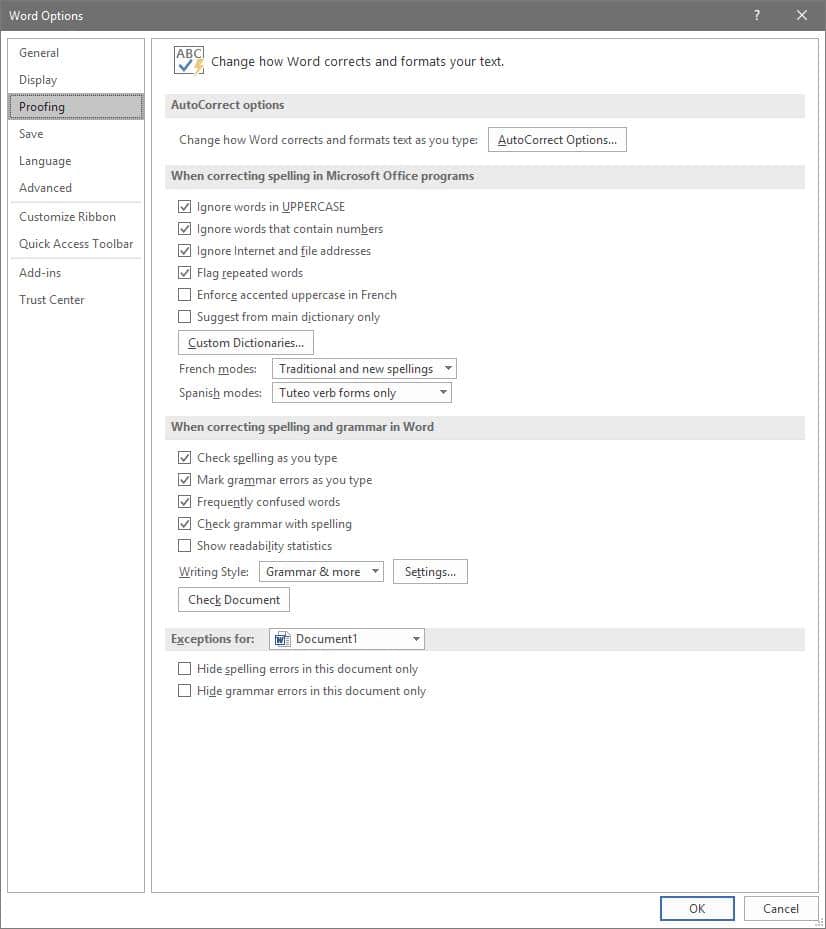
To access these rules, select File, and from there, Options. A new window should pop up with a Proofing option in the list. That page looks like this:

Adjusting AutoCorrect

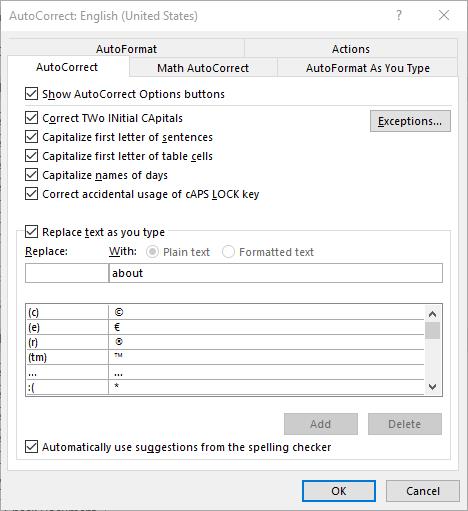
Here, you can alter a variety of proofing options, including your AutoCorrect Options. Clicking that button will present you with another window.

This window allows you to set your AutoCorrect rules, identify any exceptions you might want to make, and review how misspelled text can be automatically revised.

Establishing Grammar Rules

Returning to the Proofing List window, you also have other options that allow you to adjust Word’s corrections. For instance, clicking the Settings... button under When correcting spelling and grammar in Word provides another window. From here, you can control which grammar rules Word will flag or ignore in your copy.

Stop Worrying About Word Changing What You Write

By implementing these changes, you can prevent small annoyances from interrupting you as you work with Microsoft Word. This way, you can accomplish more without having to worry about dealing with automatic corrections again.

For more tips on how to best leverage your solutions to save you valuable time and money, subscribe to our blog!

Continue reading

Can Outsourcing Be an Option for Your Business?


Financial Benefits 

Looking outside your own business to get work done can be intimidating. Can you trust outsourced talent? Will I lose control over my business? Is it really a value? These questions and many more are reasonable to ask, but if there is one sure thing about outsourcing is that there are clear financial benefits. 

The decreased cost of outsourcing is the most well-known feature of the strategy. Obviously, it is extraordinarily expensive to onboard new help, purchase the resources that new hire needs to do the job you need him/her to do, and expand your benefits package (if you offer one) to another person. When you outsource, you may still pay a comparable rate in pay, but you will get someone that has the specific skills you need them for, and you’ll likely save a lot of capital by eliminating the associated costs.

Operational Benefits 

Your organization may see some major operational benefits from choosing to outsource. They include:

Internal Focus

Outsourcing can present a business’ leadership the ability to be more aggressive with their resources. There is a lot to do at the average business, giving regular employees access to trained and reliable resources can free them up to focus on operational issues while speeding up business significantly. 

Access to Skills

Typically, outsourcers come onboard with very specific skills and no long-term employment contract. This gives the organization the flexibility to find the gig-worker that fits the immediate needs of the company rather than committing to one employee over large swaths of time. 

Minimized Risks

In the course of doing business, decision makers are confronted with variable risks. Outsourcing allows many of the risks to be disregarded, although it creates some others. Overall, however, outsourcing will often present a net-positive situation for any business. 

Coleman Technologies offers high-value outsourced IT services and support for British Columbia businesses. If you would like to learn more, call us today at (604) 513-9428.

Continue reading

Being Busy Doesn’t Mean You’re Being Productive


A Rose by Any Other Name
Frankly, it’s pretty easy to observe that “busy” and “productive” are anything but synonymous. We all know those people who seem to be constantly running around, working on this or that. Are these people busy? Certainly. Are they actually accomplishing anything? Maybe, maybe not.

Look at it this way - you can be ‘busy’ doing anything. However, in order to be ‘productive,’ you need to actually produce something. It doesn’t matter if it’s a completed sales proposal, an email explaining away the confusion around a particularly convoluted subject, or… anything else, really, as long as it helps to advance the business’ goals.

The Inherent Issue in Comparing the Two
Unfortunately, much of our context for determining between busyness and productivity comes from the least objective source there is - our own perception.

Look at it this way: let’s say that you gave a research assignment to two employees, with a deadline of an hour. If you left, only to return and see one employee watching YouTube videos, and the other one typing away, who would you see as being the productive one? In the moment, you would probably say that it was the employee who was still typing, and not the one watching videos on the Internet. However, what if I told you that the employee watching videos was actually watching videos related to the task you had assigned, and the other was working on what would likely be their fourth unpublished novel? Or that the employee watching the videos had long since completed the assignment, and was taking a well-deserved break, while the employee who was still typing was only doing so because they had goofed off for much of the time you were away?

This illustrates two considerations: how much different productivity really is than pure busyness, as well as how similar they have the potential to be. In order to keep from fooling yourself into thinking you’re being productive when you’re really just looking busy, try asking yourself a few questions as you commence.

For example, you can take a look at how you spend your time, and compare it to what your responsibilities really are at their core.

For instance, let’s say that Bill’s job was to ensure that the company remained secure. If Bill was able to complete all of his day’s tasks in the morning, but then spent the rest of his day reading things online, what would that be considered? Well, that depends. If Bill was reading the latest Bowling Enthusiasts Weekly articles at his desk for the rest of the afternoon, that’s hardly productive. However, if Bill was researching improved cybersecurity practices to enact in the company... that’s a pretty productive way to spend the time.

A Few ‘Keeping Busy’ Red Flags
Of course, none of the following activities have to be time-wasters, they just happen to be in most situations, or require a very specific job responsibility to be considered productive. For instance, many job responsibilities don’t actually require the Internet to be used, so any time spent on it is arguably a waste. The same can be said of social media, and especially email.

Of course, there are also many exceptions to this rule. In essence, you have to use your best judgement, evaluating if a given activity is actually the best use of your time or not.

Don’t forget, Coleman Technologies has plenty of solutions to help you boost your productivity. Reach out to us at (604) 513-9428 to learn more!

Continue reading

Boosting Employee Morale Isn’t as Hard as You Think


Boosting Employee Morale Isn’t as Hard as You Think

Every business has different types of workers; often to management’s chagrin. Ideally, all of an organization’s workers would be enthusiastic about their jobs and the status of a business as a whole. Unfortunately, people don’t always have like minds about the state of things and can see their morale reduced and their productivity wane. 

Keeping your people engaged does more than build a more productive business; it saves money. Recruiting and onboarding new talent is extraordinarily expensive and time consuming, so retaining the talent you acquire is all the more important.

There are a few things any business can do to engage their employees a little better and get them to feel a little more invested, even if they work remotely. Let’s take a look at a few

Promote Work/Life Balance

In order for your business to find success, your people have to work, that is undeniable. Ironically, the best way for people to find the focus at work is to have a solid work/life balance. Today’s businesses tend to have workforces that are much more distributed than businesses of the past, and that can wreak havoc on a business’ ability to promote a dedicated company culture. It can also cause workers to work longer hours, which encourages the overwhelming pressure that business is all around them all the time, a major contributor to burnout. 

There are plenty of ways that an organization can assist their employees improve their work/life balance. They include:

  • Value productivity over time - One of the biggest problems managers cause is looking at the amount of time that an employee works rather than what they do in the time that they work. As we stated before, your business needs productivity, they don’t necessarily rely on employees to put in workweeks that run counterproductive to their mental well-being. 
  • Encourage breaks - When you are busy, work can get difficult to get away from. Encouraging your staff to take breaks to get away from the work for a little bit not only gives them a respite from the grind, but will give them a chance to use their phones, because you know they are going to. 
  • Paid time off - Most places require a business to provide some paid time off, but the more paid time that you can provide your staff, the more they can enjoy their lives outside of the workplace. Having five days of sick/vacation time is nice, but having more allows people to take a vacation, manage their outside life better; and, the better they are at that, the more effective they will be at work.  

Gamify the Workplace

One of the best ways to get superior employee engagement is to gamify your workplace. This is really a hit with the younger workforce. The theory behind gamification is that if you give everything your team does a points system and then give out prizes for the employees that produce the best work, you will get people competing for those prizes and the whole lot of work will improve. Here are three benefits to gamifying your workplace:

Improve Engagement

Part of boosting morale is improving engagement, and nothing gets people’s productive juices flowing quite as much as an open competition. The more fun a person can have while doing work, the more engaged with that work they will be. 

Recognize Excellence

A big problem that many workers have at work is that they can excel at their job and it is completely taken for granted. By gamifying your workplace, the employees that are doing the most to push your business’ initiatives forward will presumably rank high on the gamification leaderboard. This not only gives top performers the recognition they deserve, it also can work to make a lot of internal business decisions simpler. 

Improve Efficiency

When people compete for prizes, they tend to do their best to win those prizes. This means that more will get done faster. This improved efficiency is great for your business as it can speed business up and create holistic growth. The more efficient a business is, the more productive it is. The more productive a business is, the better the business performs. 

When in Doubt, Pay Better

This might be the last thing a business owner wants to hear, but this is one of the leading reasons that an employee will look for another job. If you want to avoid that, pizza parties and pats on the back will only go so far—you need to pay them competitively.

If you would like more information about how technology can be used to improve your business and help build a more productive, fun, and engaging work environment, give Coleman Technologies a call today at (604) 513-9428.

Continue reading

Build Efficiency Through Strategically-Implemented Processes


Build Efficiency Through Strategically-Implemented Processes

Every business is trying to do what they do with fewer interruptions and reduced costs. The more you can do with less, the more profitable your business can become. Building efficient processes is essential for the growing business, so this week will explore various strategies and practical tips to help you build more efficient processes.

Identify Bottlenecks

The first step towards building efficient processes is to identify bottlenecks. These are areas inside your business where there is a slowdown or obstruction that hinders productivity. By analyzing your processes and identifying bottlenecks, you can focus on improving those specific areas to enhance overall efficiency.

Streamline Workflow

Building a highly efficient workflow is crucial for building efficient processes. Start by mapping out your current workflow and identifying any unnecessary steps or redundancies. Look for ways to automate or eliminate these inefficiencies to streamline your processes. Utilizing technology and digital tools can significantly contribute to streamlining your workflow.

Communication is Key

Efficient processes rely on effective communication across all levels of an organization. Establish clear channels of communication and encourage transparency. Regular team meetings, status updates, and feedback sessions are essential to keep everyone informed and aligned. Effective communication reduces misunderstandings, minimizes delays, and enhances overall efficiency.

Invest in Employee Training and Development

Investing in the training and development of your employees can greatly contribute to building more efficient processes. Offer training programs that enhance their skills and knowledge, enabling them to perform tasks more effectively. Providing opportunities for personal and professional growth not only boosts employee morale but also empowers them to contribute to the organization's efficiency.

Keep Improving with Help from Coleman Technologies

Our consultants work with all types of companies that are looking to use technology to create a more efficient business. If you have a good idea about how our experts can help you improve your workflow, or if you would like to have a conversation about how you can improve your business, give us a call today at (604) 513-9428.

Continue reading

How to Encourage Collaboration in Your Place of Work


Have Them Socialize Outside of the Office

Let’s look at how kids behave for a moment… if told to partner up, they—almost automatically—gravitate toward their friends, the people they are comfortable spending time with. Your employees will do the same, both in and out of the office.

Collaboration greatly relies on some level of trust and familiarity, which is most effectively developed outside of the professional environment. Encourage your staff to socialize outside of work hours, or even treat them on occasion, on one condition: no shop talk. While your employees may not all be fast friends afterwards, they’ll understand one another much better and be able to work more effectively.

Tell Them What You Want

Speaking of efficacy, make sure your team understands what you expect from them in terms of results. This goes double when collaborative work is involved. A clear understanding of a task makes it easier to determine how to accomplish it, and how their combined efforts can best serve their purpose.

Walk the Walk

If you really want your team to work collaboratively, make the first move and involve yourself in the process. “Rank” or “position” should have no bearing on how able someone is to participate in a collaborative process, and there is no telling who could be struck with inspiration. Actively seek input from your team and demonstrate how you want your employees to work together.

Use Your Resources Wisely

While there’s a time for either, there is a difference between combining your resources to accomplish a given task and having your employees collaborate. The former is great if a lot of a single task needs to be finished quickly, but if a complicated process needs to be completed, it helps more to give the task to a group of people who have different proficiencies. This way, you have a better chance of the necessary skills being present in the group.

Acknowledge Accomplishments

A team that doesn’t feel appreciated is a team that won’t accomplish much. Why would they, if it doesn’t seem to matter whether they excel, or put out a thoroughly mediocre performance? This is especially the case if a single member’s performance is publicly singled out, as though they did all the work.

To encourage your team to perform well as a group, make sure that the entire group receives some recognition of their combined efforts.

Make Collaboration the Easy Option

Regardless of how motivated your team may be to collaborate with one another, it just isn’t going to happen if they don’t have the opportunity or means to effectively do so. While this may have been a more reasonable obstacle in the past, today’s available technology invalidates any excuse your team may have… mostly due to the Internet serving as the greatest collaborative tool the world has ever seen. The easier the collaborative process is, whether you lean on an Internet-based application or an internal resource or both to simplify things, the more likely it is for your employees to work with each other.

We’re Here to Help.

Coleman Technologies is ready and willing to deliver the solutions you need to promote collaboration among your staff. Give us a call at (604) 513-9428 to hear more about your options.

Continue reading

Hackers Double Down During Crisis


With many “non-essential” businesses scrambling to find strategies that will keep revenue coming through the door, setting up a remote workforce has become most businesses' best hope. Unfortunately, with such little notice to dot the Is and cross the Ts, businesses are taking on more risk than many of them are comfortable with. That trepidation is not fruitless, either. In times of crisis, hackers have a tendency to prey on the unprepared. The fact is that workers that are operating where they are not comfortable--or where they’re too comfortable--can mean disaster for their employers.

Security Threats for Remote Workers

Even if it normally is, security isn’t exactly the top priority for businesses faced with this situation. Businesses need to mitigate net-negative cash flow positions. This means they need their staff to continue working. This is stretching business’ cybersecurity strategies thin. Exacerbating things is that with so many people focused on the COVID-19 pandemic, hackers can use it as bait. 

Cybersecurity professionals and other researchers have seen an increase in ransomware attacks, trojans, and spyware as a result of this situation. They’ve also seen COVID-19 being referenced in millions of phishing attacks. Many problems that businesses face in regards to cybersecurity can be directly attributed to the remote worker. Workers at home are typically using their home PC or laptop that has all their personal accounts on it. An infected personal PC is a big problem when you are using the same PC to access work related materials. 

Additionally, hackers are now seeing a lot more success by targeting businesses directly now that security is playing second fiddle.

That is a problem since cyberattacks can decimate your business, tarnish your reputation, and end any positive momentum your business has built up. Since most businesses weren’t prepared in the least for these stay-at-home orders, the ones that are under direct scrutiny from federal, state, and industry mandates are even more exposed.

How to Protect Your Business

While any measures you take at this point to better secure your employees working remotely will be more reactive than they are proactive, it is still important to do so. We suggest that you enact the following measures to begin:

  • Cloud solutions - Rather than introducing an entrance into your business with a remote access solution, using the cloud’s capabilities enables productivity through a much simpler and more secure means than opening a gateway into your business’ infrastructure. As the cloud permits you to store your data and/or host your applications, your employees can be sure to have the resources they need to safely work from home.

  • Company devices - If you provide your team with the device they should use through their day-to-day, your business can continue to operate with the knowledge that all updates and security patches can be maintained. Despite the upfront costs of procuring the technology you will need, making this investment can provide returns to both productivity and security.

  • Employee training - Perhaps most crucially, your employees need to respect how much responsibility will rest on their shoulders in terms of maintaining cybersecurity as they work from home. Making sure they know the recommended best practices for maintaining security, as well as other preventative skills like spotting phishing attacks, will allow you to trust them more to keep your business safe from threats.

While the COVID-19 pandemic will eventually end, smart security practices both in and out of the office never should. To learn more about how we can help keep your business safe, reach out to Coleman Technologies at (604) 513-9428.

Continue reading

These Tech Solutions Can Eliminate Some Stress in the Workplace


These Tech Solutions Can Eliminate Some Stress in the Workplace

Businesses have a lot of stressful things going on at any given moment, especially when timelines and deadlines are considered. You have projects that you need to complete for your customers and employees who need to be paid on time, and you would be hard-pressed to find a situation for your organization that isn’t under some sort of time crunch. How can you use technology to make sure that these timelines are met? Let’s go over some solutions.

Automate Processes for More Efficiency

One of the best ways to save time is to make your current processes more efficient, and you can do this through automating repetitive tasks. With this technology at hand, you can complete projects and tasks faster. There are other ways that automating processes improves efficiency, as it can make it easier to organize, collaborate, and track tasks. With the right tools, you can get more done with less, making the end result even better for your bottom line.

Implement Communication and Collaboration Tools

All businesses need collaboration and communication tools, and the fact that they can now integrate allows for some pretty neat functionality. You can use video conferencing, instant messaging, and collaborative document editing and sharing to improve communication across teammates and departments. Since these solutions are hosted in the cloud, physical location is less of an issue. With anytime-anywhere access, your company can be productive in even better ways than before.

Use AI to Predict the Future and Analyze Data

If you can understand the data your business collects, you can make more informed decisions about the future. AI-powered solutions can analyze your data for trends and, in some cases, can even predict specific events, allowing you to allocate your resources accordingly.

How are you going to use technology to change the way your business operates for the better? We can help you start this process with a consultation from Coleman Technologies. To get started, reach out to us at (604) 513-9428.

Continue reading

Five Methods to Improve Team Productivity


Five Methods to Improve Team Productivity

If you want your organization to be efficient, you must increase productivity. However, this is often easier said than done, as plenty of obstacles, communication challenges, and resource allocation issues can stymie even the most well-thought-out plans. Let’s look at how you can improve productivity for your business by considering these common issues.

Why Team Productivity Can Impact the Workplace

Your team’s productivity will directly impact how your company works toward a common goal. If you can optimize productivity, you can ultimately achieve better results, profits, and employee satisfaction. Once you establish the importance of this fact, you can start to take deliberate action to work toward it.

Challenges to Team Productivity

Here are some of the major factors that can influence team productivity:

  • Poor communication - When team members aren't clear about their roles or tasks, productivity suffers.
  • Lack of clear goals - Without a shared vision, team efforts can become disjointed.
  • Inadequate resources - Ensuring your team has the necessary tools and support is vital for high productivity.

Set and Work Toward Clear, Measurable Goals

Without clear and measurable goals, your organization might struggle to unify and work toward the same ends. If you offer goals, your team can follow them like a roadmap toward the objective.

Your goals should be SMART, an acronym that stands for Specific, Measurable, Achievable, Relevant, and Time-bound. Use this framework to ensure that all goals you implement are realistic and possible within the scope of your project.

Leadership Can Promote Productivity

If you want to maximize your team's efforts, give them an effective leader. They will have an immense impact on motivation and morale. A leader must be able to offer constructive criticism and build a work environment that is conducive to productivity. If the leader wants their team to be productive, they must lead by example and set a strong standard.

Track Your Team’s Productivity

Goals mean nothing without tracking progress toward them. There are various methods you can choose, but we recommend the following:

  1. Time tracking - Measuring the time spent on tasks using productivity tools.
  2. Output-based tracking - Focusing on the results achieved rather than the time spent.

If you’re unsure which best suits your needs, feel free to reach out to us for more recommendations.

Implement Project Management Tools

Project management tools can streamline workflows and allow for increased communication, facilitating productivity. Your team can leverage these digital workspaces to great effect, working together while sharing information in real-time.

Promote a Great Workplace Environment

A great work environment can go a long way to create the motivation to sustain long-term success. It also creates an environment free of negative kinds of stress. You can encourage this type of work environment by promoting open communication. While your employees don’t always need to get along, they should at least respect each other’s professional experience and be cordial enough to work together.

Let Us Help Your Team’s Productivity

Coleman Technologies can help your organization maximize team productivity. To learn more, call us at (604) 513-9428.

Continue reading

3 Productivity Tips to Streamline Your Workday


3 Productivity Tips to Streamline Your Workday

Do you want superhuman productivity? Thankfully, it doesn’t take much to be more productive than the majority of workers out there, and a couple of small tweaks to your day can make a world of difference. Today, we’ll cover some strategies you can use for prioritization, time management, and focus, allowing you to get more work done.

Select Your Priorities

If everything is a priority, then nothing is a priority.

Take the time at the beginning of the day to determine your top three priorities. Which tasks will have the greatest impact? These are generally tasks that you’ll want to complete as soon as possible, while others can wait or aren’t nearly as time-sensitive.

If you need help nailing down your priorities, you can use the Eisenhower Matrix to determine urgent work versus important work, allowing you to identify and tackle tasks that will move the needle in the right direction.

Master Time Blocking

An effective way to better manage your time is to use time blocking to minimize distractions and improve focus.

Time blocking is when you dedicate specific chunks of time to accomplishing specific tasks. You might block out a couple of hours a day for deep work activities, like writing or problem solving. Similarly, you might leave another block of time for low-effort administrative tasks, such as answering emails or attending meetings.

Stick to your schedule, and ensure that each block of time is treated as a non-negotiable appointment with yourself.

Focus on Single Tasks

Multitasking might look like it accomplishes more on the surface, but switching tasks repeatedly can have a significant impact on your mental load and productivity.

Consider switching to a single-task approach so you can dedicate your focus to one task at a time. Studies have shown that multitasking eats into productivity and can lead to a reduction of up to 40 percent, which is significant and unnecessary. If you approach tasks as if they’re the only thing on your plate, you’ll see an increase in the efficiency and the quality of your work.

If you find this approach is challenging, take care to minimize distractions so you can attack one singular task with surgical precision.

There are a lot of ways to approach productivity, and we’ve barely scratched the surface. Ultimately, the best productivity tip we can give you is to find what works best for you, and do it consistently. Only then will you see the results you’re looking for.

For more productivity and technology tips, be sure to keep an eye on our blog.

Continue reading

Tip of the Week: Working with PDF Files


Rotate the Document

It is very easy to accidentally scan a document into your computer so that it doesn’t appear upright on your display. A program like Adobe Acrobat Pro offers an in-menu option that allows you to do just that - in Document, find Rotate Pages. This option will allow you to select the pages that need to be rotated, and how to rotate them. Other programs may feature a toolbar button that allows you to rotate each page.

Fixing your pages, despite taking a few moments of time, is certainly a worthwhile thing to do, as it makes the document easier to read, promoting accuracy and convenience.

Password Protecting the Document

As long as the person or people who need to see a particular PDF have the proper password, protecting the document in question with a password is a generally good idea - especially if it contains “for your eyes only” information. To make these files as secure as possible, make sure that the passwords are distributed through secure means.

In Word, you can save your files as a PDF using the “Save as” function, simply selecting the PDF option as you do so. You will also see a button offering More options, which brings up a second dialogue box where you can find “encrypt document with a password” in that box’s Options button. By selecting encrypt document with a password, you will have the option to provide a password (and confirm it). At that point, anyone opening the PDF will need to enter that password to view it.

Merging PDF Files

It isn’t uncommon for different parts of the same document to be saved as different PDF files, or for multiple copies to be saved with different information filled in. It is usually better to have all of this information consolidated, to make reviewing it much easier. While many free and paid software titles can allow you to do this, you should reach out to us before you select one, as we can help you make the right choice for your needs - you probably don’t want the program’s watermark on your finished document, or find yourself needing to merge more documents than a free program will allow.

If you’ve already acquired Adobe Acrobat, merging your files is fairly simple. After opening the program, access the Tools menu and select Combine files. Doing so will give you the ability to Add Files… and once you have selected all of the files that should create your new PDF, click Combine. Once they are combined, clicking Save as will allow you to store it where it belongs.

Signing a PDF

Many times, a contract that needs to be signed will arrive as a PDF. While many resort to printing these documents out to sign them, there is an easier way - signing them electronically.

This time, the free Adobe Reader software can get the job done, but you should still check with your IT resource before using it.

If Adobe Reader is approved and installed by IT, you can easily sign PDFs electronically. By opening the PDF file with Reader, you have access to a Fill & Sign button. Click it, then Sign and Add signature. You’ll then have access to three options:

  • Type - you simply type your name into the field, and an electronic signature is rendered (which will not look like yours).
  • Draw - you use your mouse to draw out your signature.
  • Image - you use a scanned image of your actual signature that is then saved for future use.

Once you’ve positioned your signature where it should be, click apply and make sure you save your revised PDF.

Always remember to check with your IT team before you download any software! For more IT tips and other useful pieces, make sure you subscribe to our blog!

Continue reading

Tip of the Week: Using Microsoft Word Templates


In actuality, you’ve used a template every time you’ve opened a Microsoft Word document… the Normal template. However, you may want to use a different template to meet your different needs. If that’s the case, you’ll need to adjust some settings as you create your document.

As you select New from the File tab, you will be presented with a few options. One of them will be Blank document, but you also have the opportunity to utilize a huge variety of other templates that can be found in the application and then downloaded. Once you have done so, select your chosen template and your new document will be generated with that template’s contents. These can include:

  • Boilerplate text
  • Styles
  • Images and logos
  • Table of contents
  • Sections that split the document into different parts, with appropriate numbering
  • Table and chart boilerplates

Of course, this isn’t a comprehensive list of your options. Feel free to explore the different templates and their options to see all that these documents can do.

Once you have a few templates downloaded, you can even edit them to better fit your needs. To do so, all you need to do is open the template you want to edit (File>Open>This PC>My Documents>Open) and make your desired changes. Once that’s done, just Save and Close.

Why Bother with Templates at All?

There are a few advantages to using templates that you should see significant benefits from, such as:

  1. Templates can be shared amongst your staff and unify your business’ style.
  2. Templates can be used to make forms much easier (and less expensive) to reproduce.
  3. Templates can reference your other applications to simplify additional tasks.
  4. Templates allow you to quickly reformat your documents if need be.

So, do you think you’ll do any investigating into templates in the future? Why or why not? Let us know in the comments, and let us know what other tips you would find helpful!

Continue reading

How Small Issues Can Snowball Into Major Operational Problems


How Small Issues Can Snowball Into Major Operational Problems

When it comes to your business’ continuity, you should know that even small issues pose a great threat—especially when they involve your business’ data. Let’s examine two situations where even small mistakes could lead to a cascade of problems that could leave your organization strapped for cash and struggling to stay alive.

Situation 1: Security Breaches

As far as security goes, it’s easy for something as simple as a phishing email to escalate into a serious problem. Imagine that someone clicks on a link in a phishing email and provides the website with their access credentials. The hacker then uses that information to log into your network and install something nefarious on your infrastructure, like ransomware. All of a sudden, you’re in a bind that asks you to either spend a ridiculous amount of money on the decryption key, or else your data will be leaked online.

Let’s say you do pay the ransom, but the hacker doesn’t provide the decryption key. Worse yet, they decide to sell the data anyway, offering other criminals access to it on the black market. And since your data is now effectively leaked online, you’re subject to compliance-related fines that are costing your business thousands of dollars.

Of course, this is all without getting into your business’ operations. During this entire process, your team cannot do their jobs, either because the data is locked down or unavailable. Worse yet, your clients find out about this, and you’re facing lawsuits and lost clientele. Good luck getting back into the game following a disaster like this when nobody trusts you with their sensitive data.

Situation 2: Disasters of Any Kind

Another example of a minor inconvenience turning into a massive problem is just about any disaster that involves your physical infrastructure. Imagine that one of the pipes in your office bathroom starts to leak. You don’t think anything of it and just place a bucket of water under the sink until you can get someone to take a look at it. Days, then weeks, then months go by. Eventually that leak develops into a serious problem, maybe during the winter when the pipes freeze.

Now imagine that your server room is directly underneath your now-broken pipes. How much water do you think a server unit can withstand?

A small problem turns into many larger (and preventable) ones. You have to fix up your physical infrastructure and potentially close your office during repairs. You have to replace technology that would otherwise be perfectly fine. You have to pay people for the time they spend waiting around for you to address the problem. And that’s not even mentioning the data lost as a result of the incident. Data backup and disaster recovery that can handle disasters both natural and manmade is vital to the continued success of any business.

Don’t Take Any Chances with Your Business’ Data

It doesn’t take a massive problem like a data breach or a natural disaster to threaten your organization’s continuity; if anything, small issues could escalate into large-scale problems when left unchecked. Make sure you’re taking precautionary measures with a managed service provider like Coleman Technologies. We can ensure your network is protected and backed up, safe and ready to go for whenever life throws a wrench into your plans. Learn more by calling us today at (604) 513-9428.

Continue reading

There are Immense Benefits Inside the Modern Productivity Suite


There are Immense Benefits Inside the Modern Productivity Suite

Productivity suites are universally one of the best tools for getting work done in the business world, so if you’re not familiar with the term, then take a moment to consider how often you use Microsoft Office products or the Google Workspace apps. These are productivity suites, and they are remarkably important and valuable for your company, whether you realize it or not.

A productivity suite gives you a collection of tools for getting work done, quickly and effectively, in a variety of modalities. You can expect the following benefits from using a productivity suite for your business.

Increased Collaboration

When people have access to the tools and resources they need to do their jobs, they can work more effectively, and more effectively together too. Productivity suites have collaboration tools built right into them, particularly for cloud-based applications that can enable multiple users to edit documents, spreadsheets, or slideshows in real-time. Sometimes productivity suites will also have other collaboration tools built right into them, like video or voice chat.

More Accessibility and Efficiency

It doesn’t matter if it’s on a desktop, laptop, or mobile device. Productivity suites are generally quite accessible in some format or another, although features might vary depending on the version you are using. They are great for remote or in-house workers, and they can be accessed from anywhere using a web browser. Depending on the solution, you might not even need to install the apps—they are that convenient and dynamic these days.

Attractive Cost Savings

Of course, there are financial benefits to going with productivity suites as well. When you subscribe to one of the aforementioned services, you get access to the whole range of apps in the suite, so instead of installing multiple instances of each app on each of your devices, you are instead setting up accounts for employees who can then use the apps as they see fit. It’s better than purchasing licenses per user, and it’s more convenient when it comes time to upgrade to new versions of the software. It makes maintenance and patch management much easier, too.

Coleman Technologies can help your business implement and manage not only its productivity suite, but its entire range of software solutions. To learn more, call us today at (604) 513-9428.

Continue reading

Like IT or Not, You Need to Keep Up


Admittedly, it can be easy to roll your eyes at statistics like these. If a method works consistently for a business, why go through the trouble of changing it? Why is it that you have to adjust how you do business, just because someone else has?

Well, there are a few reasons.

First, I want you to consider why we use computers today, rather than typewriters, or send emails and instant messages instead of carrier pigeons. It isn’t that the more traditional alternatives were inherently bad, it’s just that the technology that replaced it is better.

The technology that we all use today is still improving - becoming faster, more powerful, and more capable than what was introduced not all that long ago. 

Technology follows something called an s-curve - gradual improvement as a new method is introduced, sudden acceleration in the improvements that are made, and then it peters out as the technology reaches its limits. At this point, a new technology is presumably introduced, and the process resets.

Each time a new improvement is introduced, you have the opportunity to use a better tool than your competition does… but the same can go the other way, too. If your competition pulls too far ahead of you in its capabilities, your customer service capabilities won’t matter when compared to a service that is just better.

Using up-to-date technology solutions makes your business more efficient. When you’re dealing with a business, how long are you willing to wait to receive your promised services? 

Not only do inefficient services wear down a client’s patience, longer operations are inherently more expensive - so, in a way, you wind up spending more money to deliver a less satisfactory product or service.

Not good - but again, easily fixable with more recent solutions, like automation. Automation makes operations a lot quicker by eliminating rote processes, accomplishing this as your employees work on other things. 

Finally, you have to consider your business’ security. When so many cyberattacks are now run almost completely self-sufficiently, the protections that your business relies on will have to work far faster than any human being could.

On the other side of the coin, an increasing amount of cyberattacks are relying on human fallibility in order to take root. When phishing attacks (think the Nigerian Prince scam, but more refined and directed to your users) targeted a reported 76 percent of businesses in 2018, you need to know that you and your employees can spot them. By helping you implement the security solutions you need to protect your business on the digital side of things, and by educating your employees on how to spot threats and issues, Coleman Technologies can help keep your business safe and competitive.

Our team would be happy to talk to you about implementing the IT solutions your business really does need to remain competitive. We can also remotely maintain it for you, allowing you to go about your business without having to worry about it. Please, reach out to us at (604) 513-9428 to learn more.

Continue reading

Why Solid Project Management is So Important


Why Solid Project Management is So Important

When we talk about projects, we typically mean new technology deployment. Our technicians spend a lot of time trying to outfit our clients with the right technologies for their business. What becomes evident pretty quickly is that most businesses don’t just need help with the IT projects, they need to get the tools in place for their own project management needs. In this week’s blog, we will briefly discuss what businesses should be looking for in project management and how today’s tools can help your organization be more productive and get more done. 

Project Management and Your Business

Today’s business is much different than businesses of the past. First, all businesses rely more heavily on technology now than ever before, and many businesses are utilizing distributed workforces to get things done. Having the coordination necessary to get demand fulfilled is not always easy. This is where project managers fit in.

The truth is that a happy customer is a repeat customer. This is true in nearly every situation in every vertical market. Generally speaking, if an order is completed on time and on budget there is very little that can go wrong with the relationship. This is where project management comes in. Let’s look at what having superior project management can do and how technology fits in. 

Great Project Management Helps Your Business

Let’s take a look at three ways that project management helps your business:

Customer Satisfaction

If a project is managed properly, it can go a long way toward repeat business. As stated above, if a project comes in successfully, on time, and within the budget that was agreed upon, they will likely look to your business to do more work for them. Better yet, you may get some referrals out of a successful job. 

More Organized Business

One of the great things about strong project management is that it helps the whole project team be more organized. Therefore, the business becomes more organized. Project managers can help teams with time management, delegation of specific tasks, and the execution schedule of the entire project. 

Cost Management

Obviously, keeping costs down is a huge goal of any organization. With solid project management, projects will be more efficient, more structured, and therefore be more cost effective. 

Technology Can Drive Project Management

Technology can be a big part of getting your organization's project management to a place you need it to be. Here are three tools that can help:

Collaboration Tools

Today there are several tools that can be used to manage projects, store resources, and communicate with a team online. These apps generally have a collaborative structure to them using a forum or instant messaging. They also come with integrations that can really help a project manager drive a project forward. 

Video Conferencing

With a lot of workers working remotely or even away from a project manager within the same office, video conferencing can be an indispensable tool. Not only can it give you an easy way to meet face-to-face with individuals or the whole team, today’s video conferencing solutions tend to have plenty of collaboration options built in. 

Workflow Automation

Developing a workflow is a big part of keeping a project efficient. Team members need task lists to go by and the business/project itself is measured largely by the time and resources put into completing these tasks. By automating workflows, you can allow the project team member to focus less on the business aspects of a project and focus more on the project completion itself. 

At Coleman Technologies, we can help you procure and support the technology needed to run efficient projects. For more information, give us a call at (604) 513-9428.

Continue reading

About Coleman Technologies

Coleman Technologies has been serving the British Columbia area since 1999, providing IT Support such as technical helpdesk support, computer support and consulting to small and medium-sized businesses. Our experience has allowed us to build and develop the infrastructure needed to keep our prices affordable and our clients up and running.

get a free quote

Understanding IT

Get the Knowledge You Need to Make IT Decisions

Technology is constantly evolving, and keeping up can feel overwhelming. Whether you want to understand cybersecurity threats, explore automation, or learn how regulations like PCI DSS impact your business, we’ve made it easy to access clear, straightforward insights on key IT topics.

Insights to Understanding IT

Contact Us

20178 96 Ave C400
Langley, British Columbia V1M 0B2

Mon to Fri 7:00am–5:00pm

[email protected]

(604) 513-9428

Coleman Technologies Awards & Memberships

Image
Image
Image


