Coleman Technologies Blog

Coleman Technologies Blog

We can give your organization comprehensive IT services and 24/7/365 live support for a predictable monthly fee. Stop stressing about technology, and start focusing on growing your business.

How SMBs Use Social Media


Very Small Businesses and Self-Funded Startups

For the very small business—that is the mom-and-pop shop and the sole proprietorship—social media can be the major marketing outlet for your business. In fact, many bootstrapped startups and extremely small businesses will use Facebook as their exclusive hub for marketing outreach. Since these businesses often don’t have the capital to commit to large content-driven marketing initiatives, social media gives them a way to get their brand out there at a modest cost.

For the new entrepreneur looking to build their business from the ground up, Facebook is a very good tool. Not only does it give small businesses the opportunity to get their brand out there, it also provides them with the ability to interact with potential customers and share their culture. Other social media platforms can work for these companies too, but without the strategies and services that larger businesses use, there will always be kind of a soft cap on how effective social media can be for the really small business.

Established Small Businesses and Well-Funded Startups

As a company’s marketing budget swells, so do the possibilities, especially with social media. The established small business typically has the revenue to afford at least a middling marketing strategy and will use it to create a marketing hub, create content, and further press the issue as far as getting their brand out to the world. At this level, many businesses look to purchase the services of a marketing agency. Like managed services, a marketing agency handles a lot of the marketing for your business, so that the people in a business can focus on doing what it does best. 

Startups that are well financed function a bit different but also use agency options. They are typically trying to develop products and services and use the agency right along with the development of their offerings. This strategy, while unsustainable over time, can produce faster results if and when a product or service that will produce acceptable returns is created. 

Both rely on social media in many of the same ways smaller businesses do, but don’t necessarily run their marketing efforts through it. As mentioned previously, these businesses typically have an established web presence (or at least the means to get one quickly), and use Facebook to extend their reach. At this level, tutorial videos, webinars, and other marketing efforts are well established and using Facebook, YouTube, Twitter, and Instagram to share their experience, their culture, and their testimony from satisfied customers. 

Medium-Sized Businesses

The mid-market business is a large business, make no mistake about it. The accepted size of mid-market businesses is over 500 workers. For those businesses that operate with under five, that seems a million miles away. The mid-market business is typically well-established and their brands are known. They have teams of people (internal or outsourced) that actively use analytics (business intelligence, business analytics, etc.) to develop their advertising, marketing, and public relations strategies; all of which they need. In the mid-market, companies use social media as they feel they need to use it rather than something they must do. Most businesses will have a presence on all the major social media outlets, and many of them use social media to fuel their human resources needs. Since their social media budgets are in the five and six figures, they can take advantage of all the services these social media companies offer for businesses. 

What Social Media Platforms are Out There That Have Services for Businesses?

The easy answer to this is all of them. These are some of the richest and most influential companies on the planet at the moment, and they got to this point because people shop. Whether it’s for simply brand exposure, or whether it’s used for full-on advertising, the following social media outlets work for businesses:

  • Facebook - 1.6 billion daily active users - Facebook is the largest social media firm by leaps and bounds, and it also owns Facebook Messenger, WhatsApp, and Instagram. Facebook is currently used by over 90 percent of marketers today.
  • YouTube - 149 million individual daily users - YouTube is a great resource for the growing business. Not only is it the second largest search engine in the world, the video-sharing giant provides access to homespun content that can really take a business’ brand to the next level. 
  • WhatsApp - 1 billion daily active users - With so much of the world relying on WhatsApp, it can really be a benefit for those companies looking outside their own borders for business. 
  • Instagram - 600 million daily active users - The photo-sharing website, Instagram has been a big player in the marketing scheme for the past couple of years. Many brands look to build a campaign using influencers who direct business to specific companies. 
  • Twitter - 134 million “monetizeable” daily active users - Twitter is extremely popular, and can be a great way for individuals inside your business to promote content and deliver their knowledge to others.
  • LinkedIn - 303 million monthly active users - LinkedIn is a professional networking platform that many human resources professionals use when recruiting new talent. 

Other social media platforms that are actively used by marketers include: Reddit, Tumblr, Pinterest, Snapchat and more. 

Technology is rapidly changing the world we live in, and it is definitely changing commerce. Does your business use any of these social media platforms? Which ones do you find useful? Leave your thoughts in the comments section below and return to our blog regularly for more great technology content. 

Continue reading

What Search Engine is Truly the Best, Part 1


What Search Engine is Truly the Best, Part 1

Even if you lived under a rock, you’ve probably done a Google search or two. There are, in fact, other search engines, each with their own pros and cons. We’re going to compare some of the most popular search engines and talk about what makes them different.

Google is By Far the Most Popular Search Engine on the Planet

At the time of writing this, it’s calculated that every single second, a search is performed on Google 99,000 times. That adds up to 8.5 billion searches every day. It’s predicted that more than 92 percent of all internet searches are done on Google, but it’s possible that number is even higher.

Either way, people all over the world are more likely to say “I’ll just Google it” instead of “I’ll just search the web.”

You don’t hear anybody say “We’ll let me just Bing that,” and use Google’s closest search engine competitor, which handles about 3.5 percent of all searches, worldwide.

So what makes Google so special?

Accuracy.

Google is extremely good at giving you accurate results based on what you are looking for.

Google uses hundreds of different signals to determine what should and shouldn’t come up when you search for something, and it does it all within half a second or so, while sifting through over 30 trillion web pages to give you the best results possible.

Is it perfect? Of course not.

Can Google be tricked? Eh, sometimes. People are always trying to get their websites to rank for certain terms. This process is called Search Engine Optimization (SEO). This is a legitimate process for businesses trying to compete against their competitors on the search engines, but it can lead to bad, misleading, or undesirable results showing up on the search results page. That being said, Google is good about making it very difficult to manipulate your ranking without actually putting in a lot of hard work, so it’s less likely that inaccurate results will show up compared to the other search engines.

Still, Google tends to get you to the best result, and it gets you there the fastest.

Google Searches are Custom-Tailored to You
Here’s the other really cool thing about Google. Everyone’s search experience is a little bit unique to them. Google takes a lot of context into consideration, including your location, your past search history, the device you are on, and other information that Google knows about you, and provides curated results.

This means when you are traveling, as long as the device you are using knows its location and is letting Google know this info, you can search for a pizza place and get localized results. Google takes a ton of data points into consideration for every single query.

This isn’t always a good thing though.

Studies have been done in the past that show that Google’s search engine can sometimes contribute to a filter bubble. While this is much more common on social media platforms like Facebook and Twitter, the same can apply in some ways to Google searches.

Think of it like this. If you surround yourself with people who, for instance, truly believe that the moon is made out of cheese, you might start to see more and more information about the cheese moon than you did before. Your newfound cheese-moon friends will share news articles about how the moon is cheese. They will share memes and come up with silly nicknames for cheese-moon non-believers (like Non-Brie-lievers). They will get into fights on social media about whether the moon is more like Mozzarella or more like Gorgonzola. They will claim that all the non-brie-lievers are trying to shutter and bury any facts about how the moon is made out of cheese by sharing peer-reviewed articles from “fringe” agencies like NASA.

The point is, this creates sort of a bubble effect based on the way content algorithms work. If a platform like Facebook or Google knows that you’ll spend more time using them by keeping you happy with all the cheese-moon-affirmational content your heart desires, it’s going to be a little less accurate. If you spend a considerable amount of time seeking out results based on any particular filter bubble you are in, platforms like Google will likely curate some results that keep you trapped inside that filter bubble.

The trouble is that you won’t mind, your opinion about the cheese moon isn’t going to change, and everything you use online is helping you affirm this.

So yeah. Google is neat, and generally accurate, but it has been proven that sometimes it can go a little too far for some people. Over the last few years, Google has taken major steps to find a balance, which is actually the main reason Google doesn’t have the 98 percent market share it used to. Many folks have walked away from Google simply because it started to cater less to their fringe beliefs when it comes to hot button issues.

What are the Alternatives?

Now that the Big G is out of the way, in our next blog, we’re going to go over some of the alternatives. Be sure to stay tuned to our blog and social media.

Continue reading

Facebook and Your Privacy (Part 2)


That’s why we wanted to make sure that you knew how to reclaim your personal data and make sure it is protected. We’ll start by protecting the information that you’ve shared.

To do this, you will want to access your Facebook account on a computer. This is going to be a lot to manage, and the mobile app would only be too much trouble to navigate.

Your Security and Privacy Options

From any page on Facebook, look for the menu, which will appear as a little downward-facing arrow. This should be at the top right-hand corner of the page. Click into Settings. This little arrow is your lifeline during this process, you can always find your way back to the beginning with that menu.

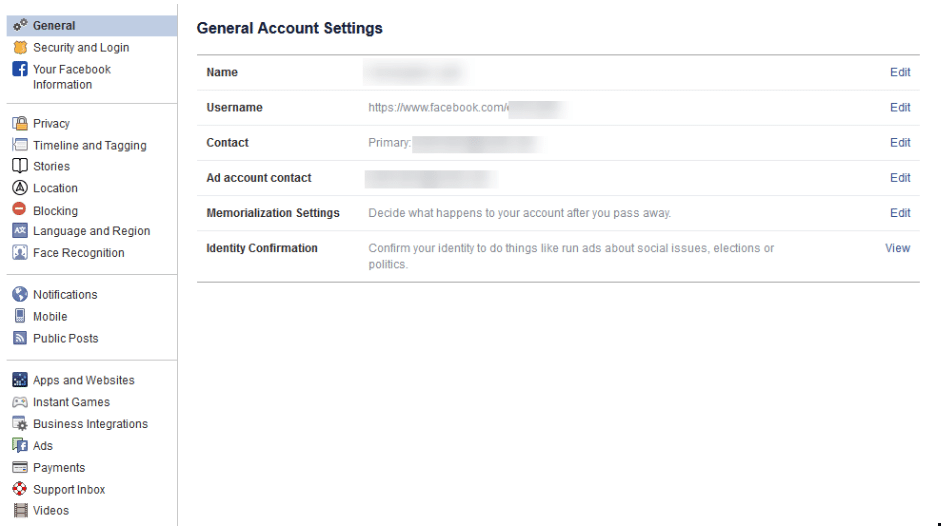
Verify the Accuracy of Your General Account Settings

Your first order of business should be to confirm that you still have access to all of the email accounts tied to your Facebook. If an account that you no longer have access to was used, account recovery becomes monumentally more difficult.

Find Out Where You’ve Used Facebook with Security and Login

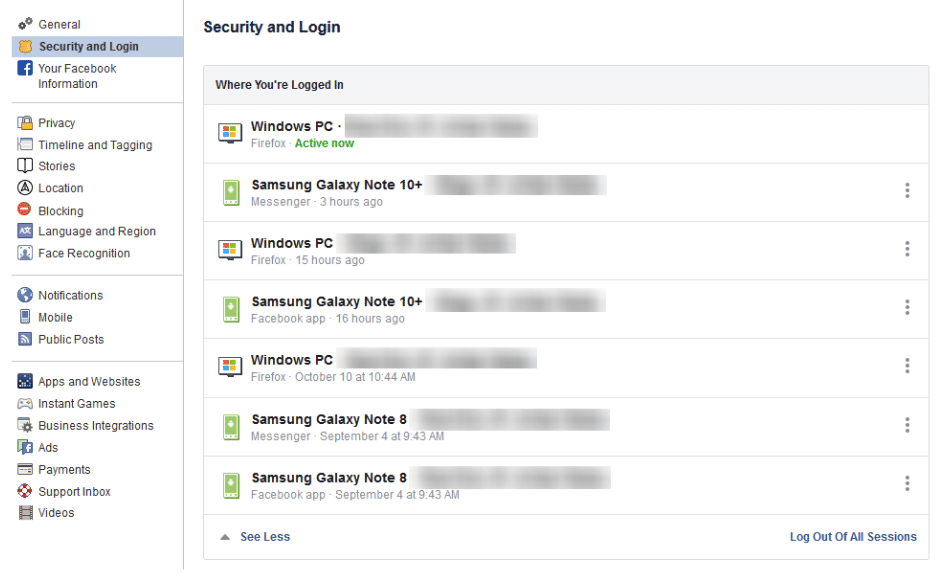
On the right, you should see the Security and Login option. Click it, and Facebook will show you all of the devices where your account is logged in. Fair warning, this can be shocking - especially since it includes where and when you last used that device, and what browser you were using to do so. The longer a user has been engaged with Facebook, the more devices will likely show up here.

If one of these devices is one that you don’t recognize, you will want to change your password immediately - we’ll go over how in a moment. First, you will want to log out of Facebook on any device that you aren’t actively using. This can be done through the three-dot icon menus next to each device listed.

Change Your Password

While we’re on the topic, this is when you will want to make it a point to update your password. It will only take a minute and might just help keep your Facebook friends from being spammed and phished. You can do this using the process provided on the Security and Login page.

Remember, you should never use a password for more than one online account.

Using Two-Factor Authentication

After your password settings, you’ll see the option to set up two-factor authentication (2FA) to help protect your account. To set it up, select Use two-factor authentication and click edit, and Facebook will provide you with the instructions you need to follow. Click Get Started

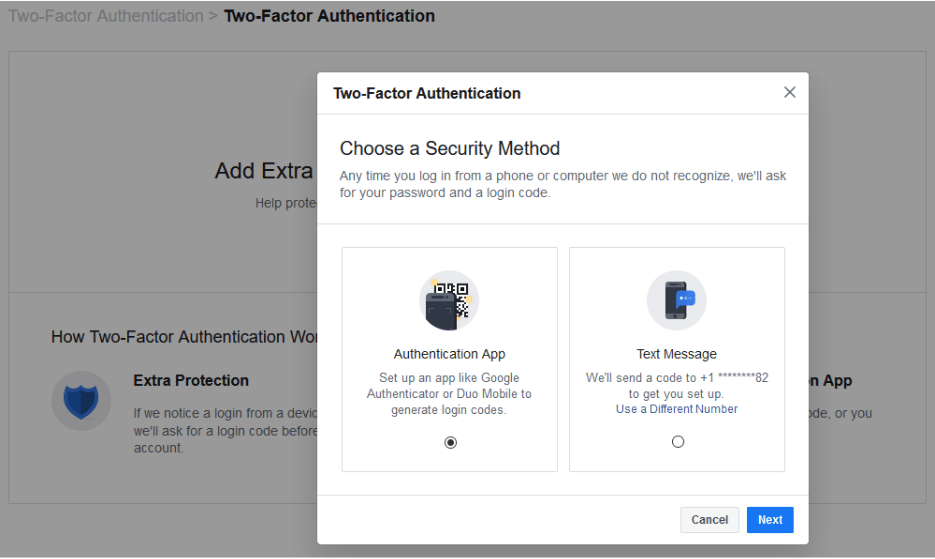
You have two options to select from as your Security Method, either using an authentication app, or to receive a text message with an additional code. Between the two, the application is the more secure option, although it does mean you need to have access to the mobile device whenever you want to check your Facebook.

Setting up the authentication app option is pretty simple. Open your application (which, if you have a Google account, might as well be Google Authenticator) and, on the computer, select the Authentication App option, as pictured, and click Next

Facebook will display a QR code, which your authenticator app should allow you to scan when you add a new account to it. The app will then give you a six-digit number to provide to Facebook as a Confirmation Code. Simple.

If you decide to use the text message option, Facebook will simply send you a code that you have to provide upon login. It isn’t quite as secure as the app, but it will do. All you have to do to configure this is to confirm an initial code with Facebook, and you’ll be walked through the rest.

Add a Backup

Once you have two-factor authentication enabled, it only makes sense to add an additional means of 2FA as an emergency backup - in this case, whichever method you didn’t choose. Honestly, you might as well set up both, and make use of the Recovery Codes option, to boot.

Under the Add a Backup option on the Two-Factor settings page, there is also a Recovery Codes option. By clicking Setup, Facebook will provide a brief explanation, and the opportunity to Get Codes. Facebook currently gives you a list of 10 single-use 2FA codes. These are one-shot codes, but you can generate a new list whenever you want from the Two-Factor Settings page. Make sure you keep these codes in a safe place.

Setting Up Extra Security

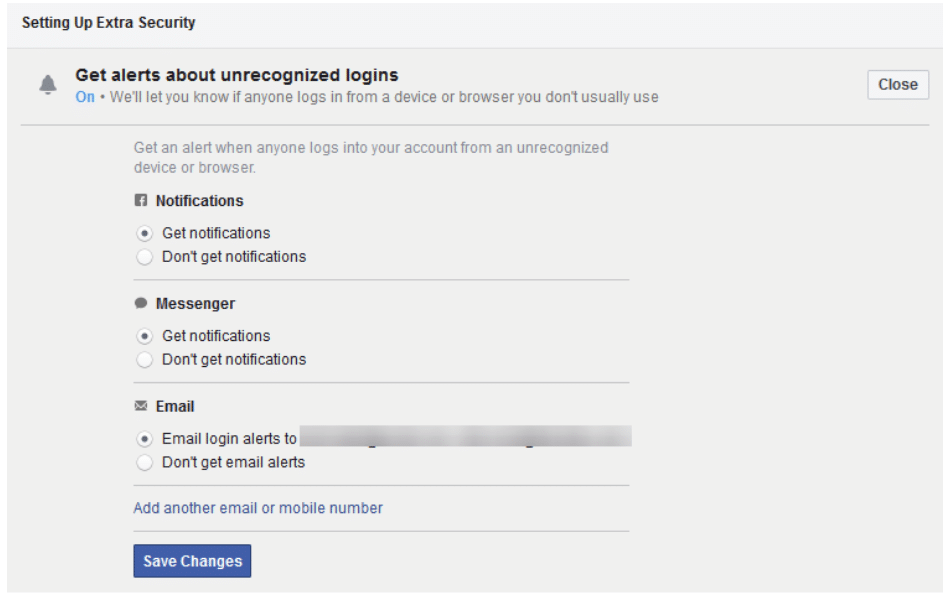
Back on the Security and Login page, scroll down to find Setting Up Extra Security. This area lets you opt-in to alerts being sent via email or text, notification, or Facebook Messenger.

You can also Choose 3 to 5 Friends to Contact if you do find yourself locked out of your account. Make sure that these are people you truly trust.

Stay tuned for part three of this series, coming soon.

Continue reading

What Search Engine is Truly the Best, Part 2


What Search Engine is Truly the Best, Part 2

Last time, we started our discussion on the best search engines by talking about the behemoth, Google. While Google is, by far, the most popular and commonly used, and arguably the most accurate search engine, it doesn’t mean it’s always the right search engine to use. Let’s talk about some other alternatives and see where they might fit in.

Microsoft Bing - Kind of the Same, but Different

Bing gets the silver medal for being the world’s second most popular general search engine. Even so, it only gets about 3.5 percent of the world’s internet searches. 

Bing is also the most similar to Google, at least as far as how it works under the hood. It’s focus is on providing accuracy and uses anonymous information from you and your search history to curate the results.

Whereas Google takes a very minimalistic approach to search, Bing usually has a visual treat for its users everyday. Each day, Bing decorates the background of its search page with a photograph with a little snippet of information about the photo. It might be some event happening somewhere in the world, a rare animal from a rainforest, a historical photo, a beautiful skyline, or literally anything else. No, it’s probably not what you were looking for, but it is kind of neat.

But on top of that, Bing also throws curated headlines, local weather, and sponsored posts right at you too. You’ll either love it, hate it, or have no feelings about it. Either way, the first impression you’ll have with Bing is that it’s busier, even before you do a search.

Something we didn’t mention last time when talking about Google—Google uses a mobile-first approach. That means sites that load well on mobile devices tend to get prioritized on Google. If your website is old and doesn’t scale properly for smartphones and tablets, you’ve probably noticed a drop in traffic over the last several years—this is why.

Bing doesn’t really care about this, but it also indexes a much smaller number of pages than Google, so the results are going to be pretty different. If you are looking for images or videos, Bing also has more options for filtering and displaying information, so it slightly outperforms Google there.

The user experience with Bing isn’t horrible, it’s just different. If you are used to using Google everyday, the transition to Bing will just feel a little strange, but it’s a decent alternative, and making the switch for a week or two is a fun experiment. We’d love to hear what you settle on.

Duck Duck Go - The Private Search Engine

Most popular search engines collect user data to curate search results. For instance, Google uses it to improve the results it gives you. Google also uses that data to help advertisers make informed decisions.

First and foremost, this data collection probably isn’t going to hurt you. It’s definitely a little weird to think about, but in the long run, it’s not necessarily tied to you as a human being. Let’s put it this way:

Let’s say, in the course of a week, three thousand people do a search for “soda,” two thousand people do a search for “pop” and a thousand people do a search for “coke.” Of those six thousand people, you are somewhere in there, looking for a soft drink. Google gathers this level of data to tell advertisers what words people use to look for certain types of products. Those advertisers can then make the decision on how they word their ads and what terms they pay money for. The data is, more or less, anonymous. Not every single company works this way (Facebook and Zoom have had data privacy scandals involving personally identifiable information), but that’s generally the gist of how this information gets used.

It’s not all sunshine and rainbows, however, and some people have just decided to take more steps to be as anonymous as possible online, and Duck Duck Go is a good search engine for those who don’t want Google to know what they are looking for.

Duck Duck Go will give you totally different results from Google and Bing, but it doesn’t use any information about you, anonymous or otherwise. It also does little to warn you when something is fraudulent. Don’t get us wrong, you can run into scams, malware, and other threats from Google results, but Duck Duck Go has fewer layers of protection. 

It also means the results aren’t going to be as localized. Looking for a nearby restaurant will only base your location on the location of your Internet Service Provider, so it might not be as accurate.

All that said, Duck Duck Go is a relatively safe option, and if you are uncomfortable with Google knowing what you search for and using that to curate your results, it’s a pretty solid solution.

An alternative to Duck Duck Go that follows a similar privacy philosophy is Qwant, a French search engine that doesn’t collect user data.

Which Search Engine Is Right For You?

It’s pretty unlikely that another search engine is going to topple the big G, but if you are more concerned about your online privacy, Duck Duck Go or Qwant are pretty good solutions. As with anything, you should always be mindful of what information you are giving up, and be careful what you click on. Even if the search engines themselves are safe, the websites they point to might not always be secure.

Continue reading

What’s Going on With Telegram and the State of Encrypted Communication?


What’s Going on With Telegram and the State of Encrypted Communication?

Sorry for the loaded title. There’s a lot to talk about, even for those of you who don’t use or even know what Telegram is.

We’ll try to sum this up, because we think there is a lot to say about security and the nature of technology in this, and like all things these days, there’s some odd rabble-rousing about this whole series of events. Who’s up for a wild ride?

Maybe you’ve seen the headlines:

Telegram Founder, Pavel Durov, Arrested in France

The entrepreneur is facing a pretty broad range of crimes. Let’s take a step back and explain who he is, and what Telegram is.

What is Telegram?

Telegram is a communications app. It’s an instant messenger, similar to WhatsApp (which is owned by Meta), Google Hangouts (which is owned by the owner of Google, Alphabet), and Signal (which is owned by the non-profit Signal Foundation).

Telegram is sort of unique, because it checks a few boxes that some users can’t get from other alternative apps, such as:

  • Telegram offers end-to-end-encryption (E2EE). We’ll explain what that is momentarily, but it’s a big one.
  • You don’t need a phone number to use it, so it feels less invasive and more private (and it’s also easier to make an account).
  • Telegram isn’t owned by some major social media conglomerate like Google or Meta.

So this supposedly super secure, super private messaging app isn’t beholden to the two biggest giants in the tech industry, and that is pretty enticing to many people.

In fact, Telegram has an active user base of about 900 million users. Facebook Messenger has around a billion active users, and WhatsApp sits at 2 billion. This clearly makes Telegram a popular service.

End-to-End-What-Now?
End-to-End-Encryption is a really important feature of modern-day messaging apps. Most anything on the web can encrypt your communication. Technically, when you post something publicly on Facebook, there is a level of encryption that keeps your activity secure.

E2EE is where your information is encrypted, and it isn’t unencrypted until it gets to the intended recipient. That means, theoretically, that not even the app provider, the Internet Service Provider, or anyone in between can intercept and view your content.

When communication is E2EE’d, and you send me a message on Telegram, it means Telegram the company doesn’t know what you sent to me.

You can see why folks would like this, right?

In a world where it feels like you can mention something in passing, and have social media sites deliver ads to you about it within minutes, it sure can feel refreshing to have a communication app that promises to keep its nose out of your business.

Seriously—just a quick tangent. I was talking with my partner about a chain restaurant we went to on a recent trip. This chain restaurant doesn’t have locations anywhere near us. The closest one is a six-hour drive away. I mentioned it to them in the car. Obviously our phones were with us at the time. I’m now getting Facebook and Twitter ads about this chain. This happens a lot, and it’s a topic for a whole other blog. Stay tuned.

So Telegram is popular, and promises security. Sounds good, right?

Oh, one more thing about the whole privacy and security thing—Telegram only uses E2EE in calls and what it calls “secret chats.” Not all communication is encrypted end-to-end on Telegram. It’s worth mentioning that because users often claim that WhatsApp is less secure, but WhatsApp does encrypt all messages, calls, and video calls.

Overall, at least on the surface, there’s a lot to like about Telegram. It’s safer and more secure than most chat apps, and if you don’t like being married to Facebook or Google, it will likely check most of your boxes.

The Telegram Controversy

Everything sounds good, right? So why is the founder and owner of Telegram, Pavel Durov, being held in France?

This doesn’t happen very often in the tech industry, but Mr. Durov, 39, is being charged as being personally liable for the behavior of users on his app. The list of crimes he’s being charged for is pretty wide, but the short of it is that Telegram is being used for a lot of illicit activity. 

Pavel Durov was detained by French authorities and is being charged with complicity in managing an online platform to enable illegal transactions by an organized group. This could lead to a sentence of up to 10 years in prison.

Some of the other charges included complicity in crimes such as drug trafficking and fraud,  enabling the distribution of child sexual abuse material, and refusing to cooperate with law enforcement.

This is an extremely unique case because we rarely see big tech entrepreneurs held accountable for something that their products and services enable others to do. Telegram probably wasn’t inherently designed to do evil, but due to its privacy and security, it is a safe haven for criminals to commit crimes.

Modern Technology: Privacy Versus Moderation

How long have we (collectively, not just those of us at Coleman Technologies) been talking about the importance of security and privacy? How long has the world been talking about the level of moderation these massive communication platforms have (or don’t have)? It feels like it’s been a long time.

For almost a decade now, Facebook/Meta has been playing tug of war with itself when it comes to moderating and controlling what sort of content spreads easily and what doesn’t. We’ve seen a major social media platform all but die the goofiest death imaginable with Twitter (or X the Everything App if any of you happen to use its newly adopted name), all in the name of moderation.

Nobody likes to be moderated. Nobody likes their chats and conversations recorded and read for the sake of advertising or analytics. However, a complete lack of moderation seems to turn a platform into a Mad-Max-style playground for bots, scammers, and cybercriminals.

Maybe AI is the answer (but someone needs to moderate the AI, and AI is extremely easy for the savvy user to deceive). Maybe we need to rely on users to be better at reporting problems. 

There really isn’t a simple answer to any of this. We are all living in a world full of misinformation and opaqueness, and it’s very easy to become absolutely exhausted by it all. Of course, content moderation can quickly go too far, and nobody wants that either.

The Cybersecurity Take on All of This

First and foremost, Telegram, Signal, Google, Facebook—all of the platforms we mentioned today are all fine to use. No matter what technology you use, there are going to be people thinking about ways to take advantage of it.

Heck, my son can’t play Minecraft without someone coming in and cheating and sneaking away with all of his coveted diamonds.

If a technology interfaces with people, some people might try to spoil the experience.

That’s why it’s important that you make yourself aware of scams and exploits. All of those platforms mentioned above aren’t designed to share malware, but a person can figure out a way to trick you into clicking a link that infects your device. None of the platforms are designed for perpetuating abuse or selling illegal substances either, but people will find a way. No technology is perfect, and even if it were, when millions of people use it, some of those folks are going to be bad eggs.

This is an important lesson for cybersecurity. You aren’t in a constant uphill battle with Microsoft, or with the concept of malware. You are in a battle against people who want to upset your business and take your money.

I’d love to hear your thoughts. If you are a business owner who is stressed out about dealing with the complexities of technology, give us a call at (604) 513-9428, and we’ll do our best to simplify and optimize it for you!

Continue reading

Real Fake Controversies and How to Avoid Them


Real Fake Controversies and How to Avoid Them

All it takes is a couple minutes on social media to see all of the “outrage” over whatever is happening in the world at the moment. Before you know it, you’re invested in some issue that you’ve never heard of up until that moment, and you’re left wondering, “Why?” Today, we want to explore this phenomenon of how social media brings you to care so deeply about things that are rarely actually your problem (and why it can be so harmful).

Understanding Crisis Mode

Social media has the power to make anything feel like an immediate crisis; this thing is happening right now and it needs your attention right now.

It has the maddening ability to turn even a simple misunderstanding into a serious allegation or outrage, and part of the problem is that social media is designed around engagement. These platforms want to push content out to people who will read it, and they profit off of the views, whether they are in the name of public outrage or entertainment. Algorithms are biased toward posts that will garner strong reactions, and they will spread quickly as a result.

This is why one single post can have astounding consequences in such a short period of time.

Rapid Spread of Information

Information spreads quickly, even if the readers don’t take time to fact-check what they’ve just consumed.

As a result, misinformation can spread, especially if it looks convincing and it aligns with the reader’s personal beliefs. All it takes is one individual sharing something, and it’s a slippery slope that could lead to countless individuals getting fooled. Whether or not it’s a real controversy is irrelevant because the masses have engineered one for themselves.

Of course, by the time corrections or real information on the issue is brought to light, it’s too late, and the damage has been done.

Picking a Side

Tribalism is a problem on social media, particularly in today’s political climate.

Social media creates this sense of “us vs them” that is perpetuated by people with similar beliefs engaging with each other. People might feel pressured to pick a side, and if they don’t, they are complicit in the act. Ultimately, this leads to a dismissal of critical thinking and makes it easier for misinformation to spread.

In fact, some users will join in the outrage just to avoid the backlash rather than point out how some people are overreacting and risk their own reputations.

Profits > People

You knew money was going to make an appearance here.

Brands, influencers, and media outlets all benefit from the public’s outrage in some way or another. Attention is synonymous with profit, and these organizations are willing to look the other way if it means more eyes are on them. It’s like an influencer who starts drama explicitly to gain followers.

The news cycle doesn’t do themselves any favors, either, as the rush to report on breaking news stories might lead to misreporting before facts can be confirmed.

How to Avoid Falling for Faux Controversy

If you want to keep yourself from falling into this trap, here are some strategies to try:

  • Slow down - Before reacting to anything online, take a moment to check the source. 
  • Verify the reliability of the information - Could there be more to the story? If a post makes you feel instantly angry, there’s a good chance it was designed to do exactly that. 
  • Seek out different perspectives - Surely there isn’t one side to every story.
  • Ignore some stuff that doesn’t matter - Remember that just because something is trending doesn’t mean it’s important—or even true.

Social media only has power over you if you grant it, so do yourself a favor and inform yourself before you spread any misinformation or fall for hoaxes.

For more information on technology, social media, business, and the Internet, be sure to keep an eye on our blog.

Continue reading

How to Use YouTube’s Full Capabilities for Your Business


Sure - if you want to limit how you can leverage it to your business’ advantage. Here, we’ve assembled a few features that you can use to make YouTube a better resource for your business.

First Up: YouTube’s Keyboard Shortcuts

Whether you’re using YouTube as a research tool or presenting your findings in a meeting, effectively using its built-in shortcuts can make your use of the website much more productive (and, let’s face it, more impressive).

If you’re doing research, jumping back to the beginning of a video will be super handy - and is possible, by pressing the 0 (zero) key. You can also use your arrow keys to fast forward or rewind the video in five-second increments (or ten-second increments, if you hold the Ctrl key at the same time).

If you’re using YouTube as a part of a presentation, you can quickly pause and resume the video by pressing either the spacebar, or the K key. If your audience can’t quite hear what you’re presenting, you can adjust the volume using the up and down arrow keys. The M key will mute the video, and unmute it when you’re ready to hear the video again.

Starting From a Specific Point in the Video

Speaking of using YouTube as a part of your presentation, you may not always want a video to start from the very beginning. YouTube gives you a few options to do so - the easiest being grabbing the altered link to your desired time directly from YouTube.

Let’s look at this video about phishing:

https://www.youtube.com/watch?v=jfnA7UmlZkE

There’s a lot of information in this video. What if you want to focus on one specific aspect, like how phishing can be spotted? This video doesn’t dive into this aspect until just about the one-minute mark. YouTube offers a function that eliminates the need of fast-forwarding to this point. Under the Share option, the menu that appears offers a Start at option. You can select the precise time that you want your video to start. The link that appears will begin your video at the moment you have selected (unless a pesky ad gets in the way):

https://youtu.be/jfnA7UmlZkE?t=63

Search Filters to Improve Your Results

If you’re having trouble finding the right content on YouTube, there are filters that you can whittle down your results by - making it more likely that you will find more videos that fit what you are looking for. You can seek out videos that were uploaded during a specific time frame, that fall within a certain duration, and seek out specific channels, playlists, and other media types - among other filters.

YouTube can be one of the greatest resources available today... as long as you can find and share the information you need. For more ways that technology can improve your business and its processes, subscribe to our blog!

Continue reading

If You See Someone Streaming Funeral Services, You’ve Spotted a Likely Scam


If You See Someone Streaming Funeral Services, You’ve Spotted a Likely Scam

Funerals are never to be taken lightly, which makes it all the worse that there are people out there willing to use these events to scam those in grief. Recently, Facebook has seen many groups that supposedly offer links to streamed funerals in exchange for credit card data, with different events being added more recently.

Let’s break down these scams and establish how to avoid them in your own life.

Scammers Claim They Provide Livestreams to Funerals

We’ve all lost someone important to us in the past, and there may have been times when we could not make it to their services or celebration of life. Scammers have realized this and are now creating Facebook pages that purportedly offer access to a stream of the event.

For instance, let’s pretend Bob P. Example recently passed away. Using the information about his planned services, a scammer can set up a Facebook group that shares the time of the events and offers to stream the services. These pages then divert those wishing to remember a loved one to an external website, where they are asked for their credit card information and—in some particularly ghoulish situations—donations in honor of the deceased.

I can’t be sure, but I’d be willing to bet that Bob would rather his loved ones keep their money and remember him as they can.

Multiple Outlets Have Spotted These Scams

Cybersecurity journalist Brian Krebs, of KrebsOnSecurity, shared that many of the links that these events pushed would go to domains referencing streaming in some way.

MalwareBytes Labs also found plenty of examples of this kind of scam, many leading to websites that required a sign-in to “watch your favorite movies.” I don’t know about you, but that’s not how I would describe someone’s streamed funeral. Once the sign-in process is complete, MalwareBytes found that the sites would then ask for credit card information, supposedly to verify that the user was in a country the site could stream to. Interestingly, hidden on the page was a preselected button authorizing a second membership and doubling the payments.

How to Keep Yourself and Others From Being Scammed

First, you should always check the website a funeral home allegedly hosting a live-streamed service maintains. Many have begun posting that funerals are not being live streamed, making this kind of disclosure to fight this very threat.

Second, you should never provide credit card details unless you are certain where your money is going. It also helps to keep some advice from the UK’s National Association of Funeral Directors in mind: 

“Watching the livestream of a funeral service is free of charge – you should never be asked for payment. Any livestream or fundraising links will be provided by the funeral director to the bereaved family, so please always check any links or pages with the family or funeral director first – and never accept friend/page follow requests, or click links, without checking them out first.”

Continue reading

Staying Safe on Social Media Boils Down to These Three Things


Staying Safe on Social Media Boils Down to These Three Things

You don’t want to get spammed; nobody does. Unfortunately, it happens to EVERYONE, and it’s just getting worse. All this unwelcome correspondence happens over the phone, through email, and especially on social media. In today’s blog, we’ll talk a little bit about how social media puts users at risk and what you can do to keep that risk from becoming a problem for you. 

How Social Media Invites Risk

Think about how integrated today’s companies are with the way you navigate online. Do you use the “sign in with ___” feature when you access other apps? Do you have near-constant notifications dinging because you have every email, every update in an application, and every message you get sending you one? Do you spend an unhealthy amount of time scrolling through shorts and reels and whatever? 

No matter what type of user you are, today’s technology has got our attention. Unfortunately, it also has gained the attention of scammers. Let’s take a look at four ways to avoid being scammed on social media.

Nothing Is Too Good To Be True, Except on Social Media

You’ve probably seen those ads: "Get thousands of dollars with this secret trick!" Yeah… no. If something sounds too good to be true, it probably is. Scammers use flashy deals to lure people in, but once you click, they might steal your personal info or install malware on your device. Always double-check offers and only trust verified sources.

Avoid Clicking on Random Links

Scammers love sending shady links in DMs, comments, and even fake emails pretending to be from brands you trust. If you don’t know the person sending it—or if the message feels a little off—don’t click. Even if it’s from a friend, their account might be hacked. When in doubt, ask them directly before opening anything. Always verify if there is any question.

People Are Often Not What They Seem

Scammers create fake accounts pretending to be celebrities, brands, or even people you know. If a friend suddenly messages you asking for money, take a step back and verify first. And if a celeb slides into your DMs saying they need you to help them with an urgent matter, just block and report. Always check for blue verification badges on official accounts and look out for weird usernames with extra numbers or letters.

Try to Keep Private Information Private

People who overshare on social media play right into the hands of scammers. Posting your full name, birthday, or even where you work makes it easier for scammers to impersonate you or hack your accounts. Also, be careful with those viral quizzes that ask for personal information. These quizzes are often phishing for answers to security questions. Keep your info locked down and update your privacy settings regularly.

Unfortunately for everyone, scammers aren’t going anywhere, but you can stay one step ahead. If you ever feel like something’s off, trust your gut. Block, report, and move on. Stay smart, stay safe, and enjoy social media, without the scams.

For more great technology-related best practices, tips, and tricks, return to our blog soon. 

Continue reading

About Coleman Technologies

Coleman Technologies has been serving the British Columbia area since 1999, providing IT Support such as technical helpdesk support, computer support and consulting to small and medium-sized businesses. Our experience has allowed us to build and develop the infrastructure needed to keep our prices affordable and our clients up and running.

get a free quote

Understanding IT

Get the Knowledge You Need to Make IT Decisions

Technology is constantly evolving, and keeping up can feel overwhelming. Whether you want to understand cybersecurity threats, explore automation, or learn how regulations like PCI DSS impact your business, we’ve made it easy to access clear, straightforward insights on key IT topics.

Insights to Understanding IT

Contact Us

20178 96 Ave C400
Langley, British Columbia V1M 0B2

Mon to Fri 7:00am–5:00pm

[email protected]

(604) 513-9428

Coleman Technologies Awards & Memberships

Image
Image
Image